How to Online Register School or Academy in 2026
How to Online Register School or Academy in 2026
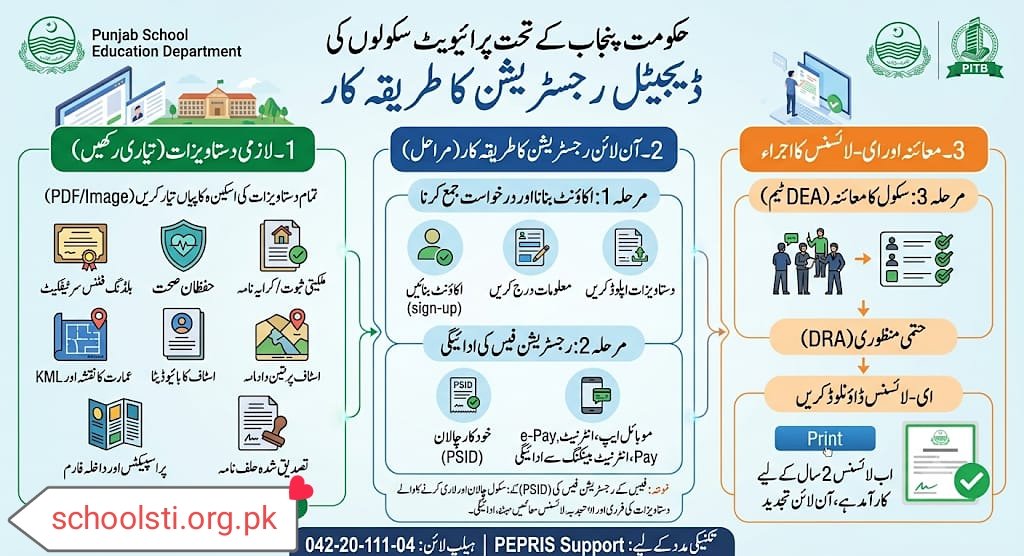
The entire procedure for registering a private school under the Government of Punjab has now been completely digitalized. For the registration of schools and obtaining e-License, the School Education Department (SED) in collaboration with the Punjab Information Technology Board (PITB) has introduced PEPRIS Portal (Private Education Provider Registration and Information System).
The complete procedure for new school registration and the details of the required documents are as follows:
1. Required Documents
Before filling the online form, keep the scanned copies (in PDF or Image format) of the following documents ready:
- Building Fitness Certificate: A building safety certificate approved by any registered engineer or architect.
- Hygiene Certificate: A certificate issued by the concerned District Health Officer (DHO) or Health Department.
- Proof of Ownership / Rent Deed: Ownership Deed or Legal Rent Deed of the school premises.
- Building Map: Approved map of the school building and KML file.
- Staff Biodata: Appointment Letters of teachers and their educational credentials.
- Prospectuses and Admission Forms: Printed prospectus of the school.
- Notarized Affidavit: Affidavit of the owner’s name and school level (Primary/Middle/High).
2. Online Registration Procedure (Step-by-Step Process)
The registration process basically consists of three steps:
Step 1: Create an Account and Submit Application
- First of all, create your account (Login) by visiting PEPRIS Sign-Up Page.
- After logging in, click on the “New Registration” option.
- Enter the basic information of the school (name, location, owner’s identity card, etc.) in the online form.
- Upload all the mandatory documents mentioned above to the system and submit the application.
Step 2: Payment of Registration Fee
- After the form is submitted, the system will automatically generate a challan form and PSID number.
- You can deposit this fee online through the Punjab Government’s e-Pay Punjab app, any bank’s mobile app, internet banking or ATM.
- (Note: The fee varies depending on the level of the school i.e. primary, middle or high).
Step 3: Inspection and Issuance of e-License
- After payment of the fee, the Chief Executive Officer (CEO) of the District Education Authority (DEA) or a committee formed by him will conduct a physical survey (inspection) of the school building and the prevailing standards.
- After the approval (OK report) of the inspection team, the District Registration Authority (DRA) will give final approval to the application.
- After approval, an e-License will be issued on your portal, which you can download and print. Now this license is valid for 2 years after which it has to be renewed online.
If you face any technical problem in the registration process, you can register a complaint by visiting PEPRIS Support or contact the helpline (20-20-111-042).
حکومتِ پنجاب کے تحت پرائیویٹ سکول رجسٹر کروانے کا پورا طریقہ کار اب مکمل طور پر ڈیجیٹلائز کر دیا گیا ہے۔ سکولوں کی رجسٹریشن اور ای-لائسنس (e-License) کے حصول کے لیے محکمہ سکول ایجوکیشن (SED) نے پنجاب انفارمیشن ٹیکنالوجی بورڈ (PITB) کے اشتراک سے PEPRIS Portal (Private Education Provider Registration and Information System) متعارف کروایا ہے۔
سکول کی نئی رجسٹریشن کا مکمل طریقہ کار اور ضروری دستاویزات کی تفصیل درج ذیل ہے:
1۔ درکار لازمی دستاویزات (Required Documents)
آن لائن فارم پُر کرنے سے پہلے درج ذیل دستاویزات کی سکین شدہ کاپیاں (PDF یا Image فارمیٹ میں) تیار رکھیں:
- بلڈنگ فٹنس سرٹیفکیٹ: کسی بھی رجسٹرڈ انجینئر یا آرکیٹیکٹ سے منظور شدہ عمارت کی حفاظت کا سرٹیفکیٹ۔
- حفظانِ صحت (Hygiene) سرٹیفکیٹ: متعلقہ ڈسٹرکٹ ہیلتھ آفیسر (DHO) یا محکمہ صحت سے جاری کردہ سرٹیفکیٹ۔
- ملکیتی ثبوت / کرایہ نامہ: سکول کی جگہ کی اونرشپ ڈیڈ یا قانونی رینٹ ڈیڈ (Rent Deed)۔
- عمارت کا نقشہ: سکول بلڈنگ کا منظور شدہ نقشہ اور KML فائل۔
- سٹاف کا بائیو ڈیٹا: اساتذہ کے تقرری نامے (Appointment Letters) اور ان کی تعلیمی اسناد۔
- پراسسکیٹس اور داخلہ فارم: سکول کا پرنٹ شدہ پراسپیکٹس۔
- تصدیق شدہ حلف نامہ: مالک کے نام اور سکول کی سطح (Primary/Middle/High) کا ایفی ڈیوٹ۔
2۔ رجسٹریشن کا آن لائن طریقہ کار (Step-by-Step Process)
رجسٹریشن کا عمل بنیادی طور پر تین مراحل پر مشتمل ہے:
مرحلہ 1: اکاؤنٹ بنانا اور درخواست جمع کرنا
- سب سے پہلے PEPRIS Sign-Up Page پر جا کر اپنا اکاؤنٹ (Login) بنائیں۔
- لاگ ان ہونے کے بعد “New Registration” کے آپشن پر کلک کریں۔
- آن لائن فارم میں سکول کی بنیادی معلومات (نام، لوکیشن، مالک کا شناختی کارڈ وغیرہ) درج کریں۔
- اوپر بتائی گئی تمام لازمی دستاویزات سسٹم پر اپ لوڈ کریں اور درخواست سبمٹ کر دیں۔
مرحلہ 2: رجسٹریشن فیس کی ادائیگی
- فارم سبمٹ ہونے کے بعد سسٹم خودکار طریقے سے ایک چالان فارم اور PSID نمبر جنریٹ کرے گا۔
- آپ یہ فیس حکومتِ پنجاب کی e-Pay Punjab ایپ کے ذریعے، کسی بھی بینک کی موبائل ایپ، انٹرنیٹ بینکنگ یا ATM کے ذریعے آن لائن جمع کروا سکتے ہیں۔
- (نوٹ: فیس سکول کے لیول یعنی پرائمری، مڈل یا ہائی کے حساب سے مختلف ہوتی ہے)۔
مرحلہ 3: معائنہ اور ای-لائسنس کا اجراء
- فیس کی ادائیگی کے بعد ڈسٹرکٹ ایجوکیشن اتھارٹی (DEA) کا چیف ایگزیکٹو آفیسر (CEO) یا ان کی تشکیل کردہ کمیٹی سکول کی عمارت اور مروجہ معیار کا فزیکل سروے (معائنہ) کرے گی۔
- معائنہ ٹیم کی منظوری (OK رپورٹ) کے بعد، ڈسٹرکٹ رجسٹریشن اتھارٹی (DRA) درخواست کو فائنل اپروو کرے گی۔
- منظوری کے بعد آپ کے پورٹل پر e-License جاری کر دیا جائے گا، جسے آپ ڈاؤن لوڈ کر کے پرنٹ کر سکتے ہیں۔ اب یہ لائسنس 2 سال کے لیے کارآمد ہوتا ہے جس کے بعد اسے آن لائن ہی رینیو (Renew) کروانا پڑتا ہے۔
اگر آپ کو رجسٹریشن کے عمل میں کوئی تکنیکی دشواری پیش آئے تو آپ PEPRIS Support پر جا کر شکایت درج کر سکتے ہیں یا ہیلپ لائن (20-20-111-042) پر رابطہ کر سکتے ہیں۔