Online Hajj Application Form and Pay Fee Digitally
Quick Summary
- Official Digital Channels: You can apply for Hajj online using the Ministry of Religious Affairs web portal (MoRA Official Portal) or the official Pak Hajj Mobile App on Google Play Store.
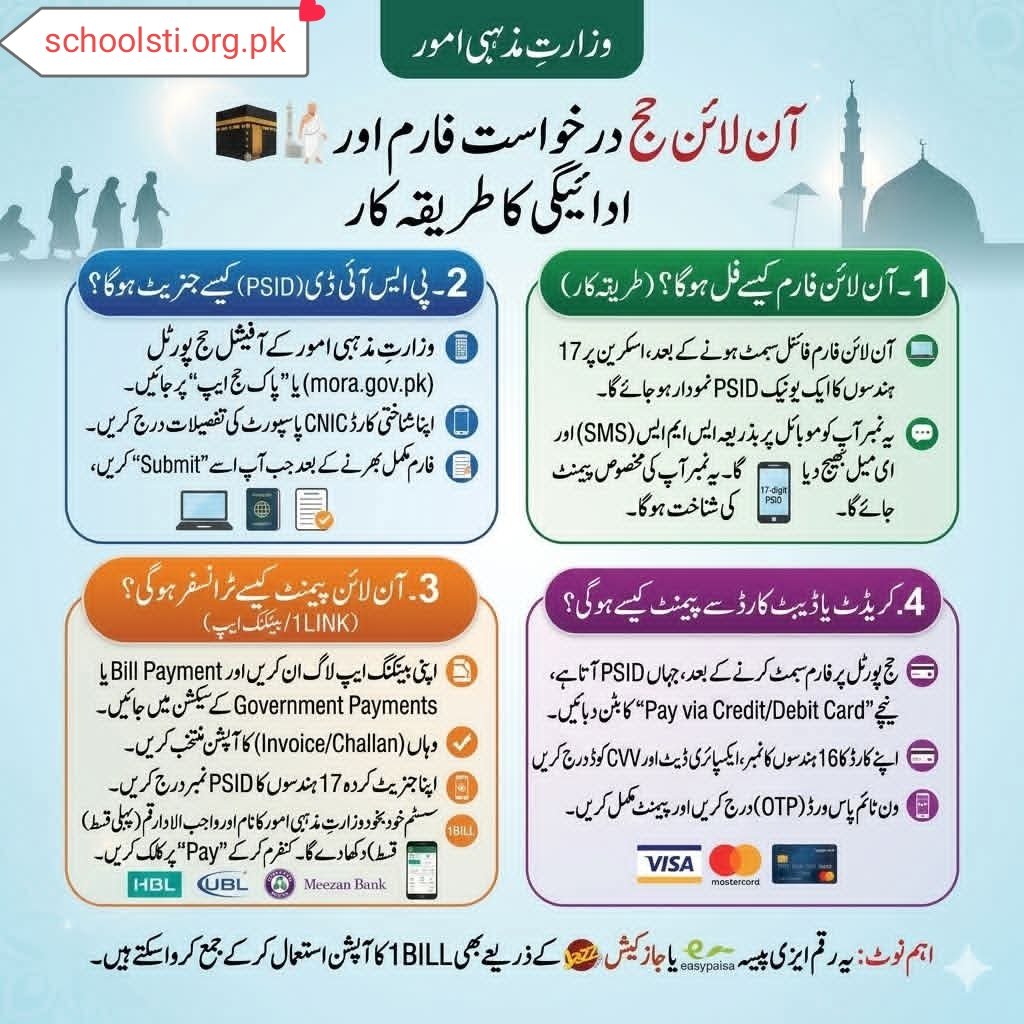
- Automated PSID Generation: Once your online application form is submitted, a unique 17-digit Payment System Identifier (PSID) is generated instantly on your screen and dispatched via SMS and email.
- Flexible Payment Methods: Fee payments can be made through mobile banking apps (using 1BILL / Government Payments), digital wallets (Easypaisa and JazzCash), or directly on the portal using any VISA/Mastercard Debit or Credit Card.
- Real-Time Verification: Payments procedure instantly through the 1LINK Network, automatically updating your application status on the official Ministry database without needing a physical bank visit.
- Essential Requirements: You need a valid Computerized National Identity Card (CNIC/NICOP), an active mobile number, an email address, and a machine-readable passport before filling out the form.
How Do You Submit the Online Hajj Application Form and Pay Fee Digitally?
To apply for Hajj online in Pakistan, submit your personal, passport, and CNIC details on the Ministry of Religious Affairs portal (mora.gov.pk) or Pak Hajj App. Upon final form submission, the structure generates a 17-digit PSID number, allowing instant fee payment through mobile banking apps, Easypaisa, JazzCash, or Debit/Credit cards.
Last twelve months, when my uncle asked me to assist him submit his Government Hajj Scheme application, he was convinced we would have to stand in a long queue outside a commercial bank branch at 6:00 AM. He had spent years hearing stories about crowded bank counters, missing token slips, and manual form rejections due to minor handwriting mistakes. When I pulled out my laptop, opened the official Ministry of Religious Affairs portal, and completed his entire registration—including payment—from our living room sofa in under twenty minutes, he was genuinely amazed.
Digitalization has completely transformed open utility and administration services across Pakistan. Just as citizens now rely on digital hubs like the SchoolSTI Educational and Public Updates Portal for streamlined access to general sector guides, official announcements, and online forms, the Ministry of Religious Affairs and Interfaith Harmony (MoRA) has fully digitized the Hajj application and fee collection procedure.
Nonetheless, moving from paper forms to online portals comes with its own learning curve. Various applicants run into technical confusion: Where do you find the PSID? Why is the 1BILL option not showing up in certain banking apps? What should you do if your card transaction fails at the OTP stage?
Having walked through this exact online submission and payment process multiple times for family members and friends, I have documented every step, shortcut, potential technical bump, and practical lesson learned. Whether you are applying for yourself or helping an elder relative navigate the digital portal, this guide will walk you through the entire procedure clearly and stress-at no charge.
[ Apply Online – Official MoRA Hajj Portal ]
What Documents and Prerequisites Do You Need Before Filling the Hajj Form Online?
Before you unrestricted the browser or launch the mobile app, having all required credentials on hand saves time and prevents session timeouts on the administration server. The online validation engine cross-references your inputs directly against national databases like NADRA. If any entered detail conflicts with official records, the portal will pause or reject your submission.
Here is the exact checklist of items you should prepare beforehand:
1. Computerized National Identity Card (CNIC or NICOP)
Ensure your CNIC or National Identity Card for Overseas Pakistanis (NICOP) is valid and unexpired. The name, date of birth, and father’s or husband’s name you type into the online fields must match your physical card letter for letter.
2. International Machine-Readable Passport
You need a machine-readable passport valid for at least eight months beyond the travel period. Make sure your passport number is clear, and check that you have at least two blank pages left for visa stamping. If your passport is currently under renewal at the passport office, wait until the physical passport is issued before attempting final booking, as entering an incorrect or pending passport number will cause verification errors later.
3. Active Mobile Phone Number and Email Address
The mobile phone number you deliver must be active, registered in your own name, and able to accept short text messages (SMS). Network-ported numbers (such as a number moved from Telenor to Jazz) can occasionally experience delays with automated authority SMS gateways. Keep an active email inbox unrestricted in another browser tab as well, as your PSID voucher and submission confirmations are delivered to both destinations simultaneously.
4. Nominee (Next of Kin) Information
You will require the CNIC number, full legal name, relationship details, and contact number of your designated emergency contact or nominee.
5. Passport-Sized Photographs and Health Credentials
Keep a soft copy (JPEG or PNG format, under 2 MB) of a recent passport-sized photograph taken against a plain light background. Additionally, note down any pre-existing medical conditions or physical assistance requirements, as the portal includes mandatory health declaration fields.
How Do You Fill out the Online Hajj Application Form Step-by-Step?
The Ministry of Religious Affairs provides two chief official digital touchpoints for submitting your application: the web portal at MoRA Official Website (or hajj.mora.gov.pk) and the mobile application titled “Pak Hajj App,” obtainable on the Google Play Store and Apple App Store. Both platforms circulate the exact identical backend database and workflow.
Here is the step-by-step walkthrough for filling out the form accurately:
[ Step 1: Account Creation & Login ]
             │
             ▼
[ Step 2: Personal & Identity Data Entry ]
             │
             ▼
[ Step 3: Hajj Scheme & Group Selection ]
             │
             ▼
[ Step 4: Passport & Nominee Details ]
             │
             ▼
[ Step 5: Review & Final Submission ] ──► [ 17-Digit PSID Generated ]
Step 1: Create Your User Account
- Unrestricted your desktop browser or launch the Pak Hajj App on your smartphone.
- Click on the Sign Up / Register button.
- Enter your Full Legal Name, CNIC Number (without dashes), active Mobile Number, and Email Address.
- Build a strong password, reply the uncomplicated security math prompt (captcha), and click Sign Up.
- Log into your newly created account using your registered CNIC or email address.
Step 2: Enter Personal and Identity Information
- Once inside the dashboard, select New Application.
- Input your personal details: Full Name, Gender, Date of Birth, Father’s Name (or Husband’s Name), Marital Status, and Occupation.
- Select your current residential address, district, and nearest departure station (e.g., Islamabad, Lahore, Karachi, Peshawar, Quetta, Multan, or Sialkot).
Step 3: Choose Hajj Scheme and Group Details
- Select your preferred scheme (Government Hajj Scheme or Private HGO, depending on active registration windows).
- If you are traveling as an individual, select Single Applicant. If you are applying alongside family members or friends, select Group Application.
- For group applications, establish a Group Leader. The portal generates a Group Code that allowed co-applicants can utilize to join the same application bundle.
Step 4: Fill Passport, Health, and Nominee Data
- Carefully input your passport number, date of issue, and expiry date.
- Select your blood group and disclose any medical conditions (such as diabetes, hypertension, or mobility requirements).
- Supply your nominee’s full name, CNIC, mobile number, and home address.
Step 5: Final Review and Submission
- Review through the summary preview page line by line. Verify that there are no spelling errors in your name or passport digits.
- Tick the legal declaration box agreeing to official terms and health guidelines.
- Click the Submit button.
A usual issue I noticed during my primary submission attempt was trying to click submit while leaving a mandatory dropdown—like the blood group or departure airport—unselected. The page would refresh without showing a apparent error message. If your page does not operation immediately, scroll back up and create sure every field marked with an asterisk is filled out.
How Is the 17-Digit PSID Generated and What Is Its Purpose?
The moment you click the final Submit button on the portal or app, your submission shifts from draft status to pending payment status. At this exact point, the framework generates a unique 17-digit Payment System Identifier (PSID) directly on your device screen.
+-------------------------------------------------------------------+
|                        MINISTRY OF RELIGIOUS AFFAIRS              |
|                             HAJJ APPLICATION VOUCHER              |
+-------------------------------------------------------------------+
|  Applicant Name : Muhammad Usman                                  |
|  CNIC Number    : 35202-XXXXXXXX-X                                |
|  Application No : HAJJ-2026-984120                                |
+-------------------------------------------------------------------+
|  YOUR UNIQUE PSID (17-DIGITS):                                    |
|                                                                   |
|       1 0 0 0 0 9 8 7 6 5 4 3 2 1 0 9 8                           |
|                                                                   |
+-------------------------------------------------------------------+
|  Status         : PENDING PAYMENT                                 |
|  Payable Amount : Rs. 200,000 (First Installment)                 |
|  Valid via      : 1BILL / Banking Apps / JazzCash / Card          |
+-------------------------------------------------------------------+
What Does the PSID Do?
The PSID acts as a central financial bridge created by the State Bank of Pakistan and the 1LINK Network. Instead of writing physical bank drafts or submitting paper deposit slips, this 17-digit code links your online Hajj application directly to the government treasury account.
Where Can You Find Your PSID If You Accidentally Close the Window?
If your internet drops or you shut your browser tab right after submitting, don’t worry—your application is not lost:
- SMS Notification: The portal automatically dispatches an instant text message to your registered mobile number containing the 17-digit PSID.
- Email Voucher: An official payment voucher with the PSID printed clearly on foremost is emailed to your inbox as a downloadable PDF.
- Dashboard Retrieval: You can log back into
hajj.mora.gov.pkor the Pak Hajj App at any duration, navigate to “My Applications” or “Inquiry,” enter your CNIC, and view your active PSID.
How Do You Pay the Hajj Fee Online Via Mobile Banking Apps using 1BILL?
Paying your Hajj dues through your bank’s mobile application is usually the fastest and most secure method. Nearly every major commercial and Islamic bank operating in Pakistan—including Meezan Bank, Habib Bank Limited (HBL), United Bank Limited (UBL), Allied Bank (ABL), Bank Alfalah, and MCB—supports direct PSID clearance via the 1BILL infrastructure.
Here is the exact navigation path inside standard mobile banking apps:
1. Log In to Your Banking App
Open your mobile banking application (e.g., Meezan App, HBL Mobile, or Digital App) and authenticate using your biometric thumbprint or passcode.
- Tap on the Payments, Bill Payment, or Transfers menu on your home dashboard.
- Look for the sub-category named Government Payments, GOP, or 1BILL.
3. Select 1BILL Invoice or Challan
- Within the 1BILL options, select 1BILL Invoice or 1BILL Top-Up/Challan.
- Important Note: Always opt for “1BILL Invoice” rather than “1BILL Credit Card” or “Utility Bill,” as PSIDs generated by state portals are recognized as 1BILL Invoices.
4. Enter Your 17-Digit PSID Number
Paste or carefully type the 17-digit PSID number into the consumer ID field.
5. Fetch and Confirm Details
- Tap Fetch Bill or Continue.
- The banking application will automatically fetch the live record from the Ministry of Religious Affairs database.
- On your phone screen, you will clearly see:
- Company/Biller Name: Ministry of Religious Affairs / MoRA
- Consumer Name: Your Legal Name
- Due Amount: The exact required initial Hajj installment amount
- Verify that the displayed name matches your application record perfectly.
6. Execute Payment and Save Receipt
Tap Pay Now, complete the One-Time Password (OTP) verification sent by your bank via SMS, and finalize the payment. Immediately take a screenshot of the successful transaction confirmation screen and save the PDF payment receipt generated by your bank.
How Do You Transfer Hajj Dues Using JazzCash or Easypaisa?
If you do not hold a traditional commercial bank account, or if you prefer using a digital wallet, you can easily evident your Hajj fee PSID using JazzCash or Easypaisa. Both platforms run on the 1BILL billing standard.
Method A: Paying via Easypaisa App
- Unrestricted the Easypaisa mobile app and log in.
- On the chief dashboard, tap Bill Payment.
- Select Government Fees or search for 1BILL.
- Opt for 1BILL Invoice / Challan.
- Enter your 17-digit PSID number and press Next.
- The screen will display the Ministry of Religious Affairs title alongside your payable dues.
- Confirm your balance and tap Pay Now.
Method B: Paying via JazzCash App
- Accessible the JazzCash mobile app and log in.
- Scroll down to the Government Payments or Corporate Payments section.
- Tap on 1BILL, then select 1BILL Invoice.
- Type in your 17-digit PSID number.
- Review the fetched bill details showing your name and the required Hajj dues.
- Enter your MPIN or utilize biometric verification to confirm the transaction.
Method C: Paying via USSD Code (Without Internet)
If you are using a basic aspect phone or lack internet access on your mobile network:
- Dial
*786#on your JazzCash-registered SIM card. - Select Pay Bills -> Government Payments -> 1BILL.
- Enter the 17-digit PSID number.
- Review the auto-replied prompt showing your name and amount, then enter your 4-digit MPIN to authorize.
How Do You Pay the Hajj Fee Directly Using a Debit or Credit Card?
For applicants who prefer paying directly on the web portal without switching over to a separate banking app, the Ministry of Religious Affairs offers an integrated online payment gateway accepting VISA and Mastercard credit or debit cards.
[ Form Submission Screen ]
           │
           ▼
[ Click "Pay via Credit/Debit Card" ]
           │
           ▼
[ Enter Card Number, Expiry, CVV ]
           │
           ▼
[ Enter 3D-Secure OTP Sent by Your Bank ]
           │
           ▼
[ Instant Payment Confirmation & E-Receipt ]
Step-by-Step Card Payment Walkthrough:
- On the post-submission confirmation screen on
hajj.mora.gov.pk(where your PSID is displayed), locate and click the button labeled Pay via Credit/Debit Card. - You will be redirected to a secure payment gateway page.
- Enter your 16-digit Card Number, Expiration Date (MM/YY), and the 3-digit CVV/CVC Code printed on the back of your card.
- Click Submit Payment.
- Your card-issuing bank will automatically trigger a 3D-Secure authentication prompt requiring a One-Time Password (OTP).
- Enter the OTP received on your mobile phone or email address and press Authorize.
- Once verified, the gateway will return a “Payment Successful” notice, and your application status will immediately flip from Pending to Paid.
A Practical Lesson on Card Transaction Limits
When I tried using my standard debit card for a high-value authority installment, the initial attempt was unexpectedly declined. After a speedy phone call to my bank’s customer service helpline, I discovered that my card had a default daily e-commerce spending limit that was lower than the required Hajj installment amount.
If your debit or credit card payment gets declined despite having sufficient funds:
- Open your bank’s mobile app and navigate to Card Management.
- Check if Online/E-Commerce Transactions are toggled ON.
- Temporarily increase your Daily E-Commerce Limit to cover the Hajj installment fee.
- Retry the card transaction on the portal.
Hajj Online Registration and Payment Methods Comparison
To help you decide which digital method fits your current situation top, here is a breakdown comparing speed, convenience, and processing features across all supported payment channels:
| Payment Method | Primary Platform / App | Requirements | Processing Time | Recommended For |
|---|---|---|---|---|
| 1BILL Banking App | Meezan, HBL, UBL, ABL, Alfalah, etc. | 17-digit PSID & Bank App Account | Instant (Real-Time via 1LINK) | Applicants with active bank accounts seeking zero extra charges. |
| Digital Wallets | Easypaisa / JazzCash | 17-digit PSID & Wallet Account balance | Instant | Applicants without traditional bank accounts or using feature phones (*786#). |
| Credit / Debit Card | VISA / Mastercard on Portal | Card Number, Expiry, CVV, 3D-Secure OTP | Instant | Overseas Pakistanis or applicants paying directly inside the portal. |
| Over-the-Counter (OTC) | Designated Commercial Bank Branches | Printed PSID Voucher & Cash / Pay Order | 1 – 2 Hours | Applicants who prefer physical bank stamped receipts and cash processing. |
How Do You Verify Payment and Track Application Status Online?
Once you have completed your payment through your mobile banking app, digital wallet, or card, you should verify that the Ministry’s database has logged your funds correctly.
[ Visit hajj.mora.gov.pk or Pak Hajj App ]
                    │
                    ▼
[ Go to "Application Inquiry / Check Status" ]
                    │
                    ▼
[ Enter CNIC, Passport, or Application Number ]
                    │
                    ▼
[ System Displays: Status = PAID / VERIFIED ]
Steps to Check Your Status:
- Visit the MoRA Hajj Management System portal or accessible the Pak Hajj App.
- Click on the Check Status or Application Inquiry tab.
- Enter your CNIC Number, Passport Number, or Application Tracking ID.
- Click Search.
- The structure will display your full profile along with a updated payment indicator:
- Pending Payment: Payment has not yet been initiated or cleared.
- Payment Successful / Verified: Your fee has been received by the administration treasury via 1LINK, and your application is formally locked for processing/balloting.
Print or save a PDF copy of this updated status page alongside your bank payment transaction receipt for your personal record folder.
What Common Mistakes Should You Avoid During Online Hajj Registration?
Even basic digital systems can lead to frustration if small mistakes are overlooked. Here are the most frequent pitfalls applicants encounter and how to avoid them:
1. Waiting for a Physical Passport Before Pre-Registering
In recent cycles, the Ministry has allowed initial digital registration using just your CNIC, provided you obtain and verify your valid machine-readable passport before the final booking and travel phase. Delaying your initial registration since your passport renewal is still in progress can cause you to miss tight submission deadlines.
2. Typing Mistakes in Your PSID Number
A single inaccurate digit typed into your banking app’s 1BILL field will outcome in an “Invalid Consumer ID” error message. Invariably copy and paste the 17-digit PSID directly, or cross-check every three digits carefully before confirming payment.
3. Paying Before Finalizing Group Members
If you plan to travel with your spouse, parents, or family group, create sure you insert all co-applicants to your group application before submitting the form and generating the final group PSID. Attempting to merge individual applications into a group after payments have been processed individually requires manual administrative intervention at the Ministry standard.
4. Ignoring Bank E-Commerce and Daily Transfer Limits
As mentioned earlier, card payments and 1BILL transfers often fail simply given that your bank account has a default daily transfer cap. Check your account’s daily transaction limit inside your banking app prior to making the transfer.
5. Trusting Unofficial Third-Party Websites or Agents
Never enter your CNIC, passport details, or banking passwords on third-party blog forms, social media links, or unofficial agent portals promising “guaranteed priority balloting.” Only apply the official authority portal at MoRA Official Portal or the verified Pak Hajj App.
Frequently Asked Questions (FAQs)
How long is the generated PSID valid for payment?
The 17-digit PSID generated after submitting your Hajj form remains valid until the official fee collection deadline announced by the Ministry of Religious Affairs for that particular phase. Nonetheless, it is strongly recommended to pay the dues within 24 to 48 hours to avoid server congestion near closing dates.
Can overseas Pakistanis pay the Hajj fee using foreign cards?
Yes. Overseas Pakistanis holding a valid NICOP and international machine-readable passport can submit their form online via the portal and clear their dues using any international VISA or Mastercard that supports 3D-Secure online transactions. Alternatively, family members in Pakistan can pay the PSID locally via any Pakistani banking app or 1BILL.
What should I do if my bank account was debited however the Hajj portal still shows “Pending”?
In rare instances of network latency between your bank and 1LINK, funds may leave your bank account while the Ministry portal updates with a short delay. Wait 30 to 60 minutes and refresh the status page. If it still displays “Pending” after two hours, contact your bank to gain the 1LINK Transaction Reference Number (RRN) and submit an online inquiry on the MoRA helpline portal.
Can I pay the Hajj fee in installments using the PSID?
Whenever the Government Hajj Scheme announces a multi-installment payment policy (e.g., earliest installment with application, second installment after balloting selection), a fresh PSID is generated for each specific installment window. You must pay the exact amount displayed for that active PSID.
Is there any extra bank fee charged when paying via 1BILL?
No. Paying administration challans and MoRA Hajj dues via 1BILL on mobile banking apps, Easypaisa, or JazzCash does not incur any additional service charges for the applicant under standard administration electronic payment regulations.
Final Thoughts & Actionable Checklist
Submitting your Hajj application online does not have to be an intimidating chore. The Ministry of Religious Affairs has created a streamlined, fully integrated digital workflow that saves you time, eliminates physical bank queues, and gives you instant digital verification.
Here is your prompt summary checklist to full your application smoothly nowadays:
- Gather Credentials: Collect your unexpired CNIC/NICOP, Passport, picture softcopy, and emergency contact info.
- Fill Form: Sign up at MoRA Official Website or unrestricted the Pak Hajj App, input your details, and submit your form.
- Note Your PSID: Copy the 17-digit PSID number generated on screen or received via SMS/email.
- Pay Online: Open your mobile banking app, select 1BILL Invoice, paste your 17-digit PSID, verify your name and dues, and full the transfer.
- Verify Status: Log back into the status portal to confirm your status displays Paid, then download your electronic receipt.
[ Apply Online – Official MoRA Hajj Portal ]
Official Reference Links
- Ministry of Religious Affairs Official Website: https://www.mora.gov.pk/
- Official Hajj Management & Status Portal: https://hajj.mora.gov.pk/
- Pak Hajj Mobile App (Android Play Store): Pak Hajj App on Google Play
- 1LINK Payment Gateway Information: 1LINK Network Pakistan
- Public Utility & Educational Updates: SchoolSTI Educational Portal
About the Author
Majid Farooq is a seasoned technology blogger, web developer, and digital services analyst based in Pakistan. With years of hands-on experience evaluating public sector IT portals, online payment gateways, and e-governance tools, he specializes in writing practical, step-by-step technical guides that simplify complex online procedures for everyday users.
Last updated: August 13, 2026

Hajj 2027