Punjab SED e-Transfer Round 2026
Punjab school department e transfer round September 2026
Punjab school department e transfer schedule September 2026
Punjab school department e transfer notification September 2026
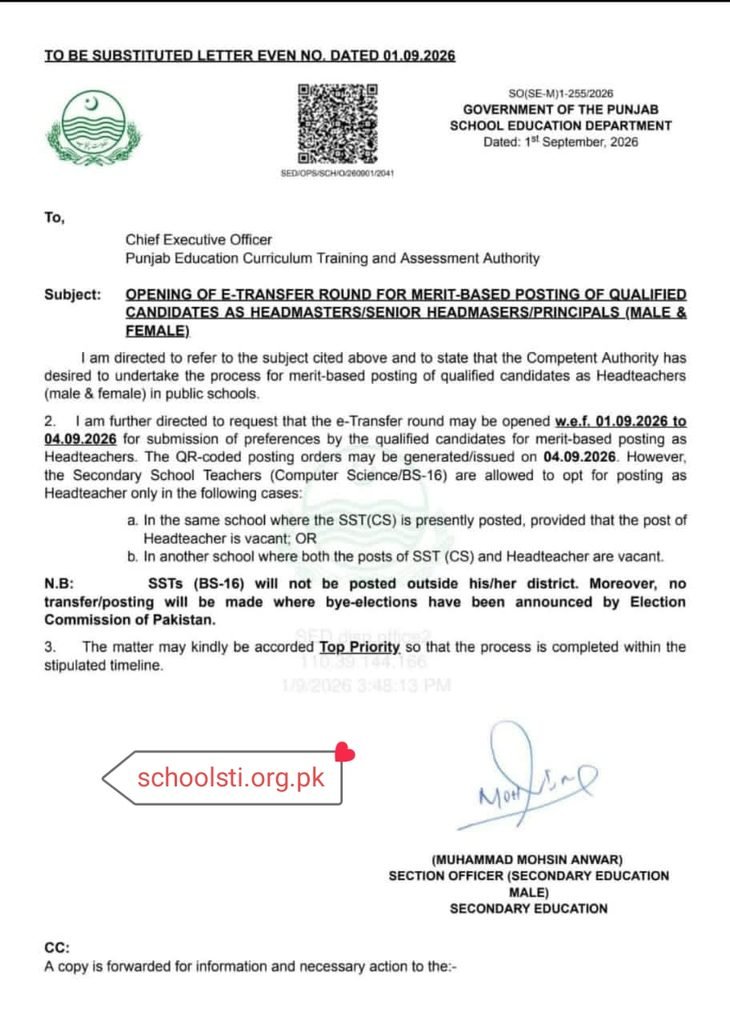
Punjab SED e-Transfer Round 2026: Merit-Based Posting for Headmasters, Senior Headmasters & Principals
Quick Summary
- Official Notification: Government of the Punjab School Education Department (SED) notification No.
SO(SE-M)1-255/2026, dated September 1, 2026. - Target Positions: Qualified male and female candidates for Headmaster, Senior Headmaster, and Principal posts in open high and higher secondary schools across Punjab.
- Application Window: Open on SIS / SEDHR from September 1, 2026, to September 4, 2026.
- Order Generation: Automated QR-coded posting orders scheduled for release on September 4, 2026.
- SST Computer Science Restriction: SST (CS/BS-16) can only apply if the Headteacher post is vacant in their own institution, or if transferring to another academy where both SST (CS) and Headteacher seats are vacant.
- Geographical Limits: SSTs (BS-16) cannot be posted outside their home district.
- Election Bar: No transfers or postings in tehsils/districts where the Election Commission of Pakistan (ECP) has announced bye-elections.
The Punjab School Education Department has officially opened a quick-track e-Transfer round from September 1 to September 4, 2026, allowing qualified male and female candidates to submit online school preferences for merit-based posting as Headmasters, Senior Headmasters, and Principals via the SIS app and SEDHR portal, with QR-coded orders issuing on September 4.
If you have spent any duration navigating the School Information System (SIS Punjab) during an active transfer window, you recognize the feeling. The moment an official notification drops from the Civil Secretariat in Lahore, phone lines launch buzzing, WhatsApp groups light up with screenshots of vacant EMIS codes, and the server begins to crawl under thousands of simultaneous logins.
This particular notification—issued on September 1, 2026, under letter number SO(SE-M)1-255/2026 by Section Officer (Secondary Education Male) Muhammad Mohsin Anwar—is especially critical. Unlike broad unrestricted-transfer phases where entire cadres apply at once, this round is strictly targeted at filling administrative leadership roles across Punjab’s high and higher secondary schools through pure merit.
With only a narrow 4-day window to log in, review vacant seats, and lock in preferences before automated QR-coded orders generate on September 4, every hour counts. Below is a entire breakdown of the notification, the particular eligibility criteria, the vital restrictions placed on Secondary School Teachers of Computer Science (SST CS), and a practical walkthrough to ensure your preference list does not acquire rejected.
What Is the Punjab SED Notification SO(SE-M)1-255/2026 About?
The School Education Department Punjab has directed the Punjab Education Curriculum Training and Assessment Authority (and the associated technical teams at PITB) to open the automated e-Transfer module specifically for candidates who have qualified for administrative leadership slots.
This phase focuses exclusively on merit-based postings for three leadership tiers:
- Headmasters & Headmistresses (BS-17)
- Senior Headmasters & Senior Headmistresses (BS-18)
- Principals (Male & Female / BS-19 & BS-20)
For months, hundreds of newly promoted or selectee administrators have been waiting for formal institutional postings. Many have either been serving on officiating/temporary charges or waiting at the disposal of District Education Authorities (DEAs). This round provides a transparent, algorithmic allocation based on validated merit criteria, removing manual discretion and discretionary paperwork from the operation.
For updates regarding recruitment schedules, departmental gazettes, and teacher allocations across districts, you can also track actual-time circulars on the Schools STI Portal.
+-------------------------------------------------------------------------------+
|                       CRITICAL TIMELINE AT A GLANCE                           |
+-----------------------------------+-------------------------------------------+
| Stage                             | Date & Time Window                        |
+-----------------------------------+-------------------------------------------+
| Submission of School Preferences  | September 1, 2026 to September 4, 2026    |
| Portal Platform                   | SIS Punjab App / SEDHR Web Portal         |
| Issuance of QR-Coded Orders       | September 4, 2026                         |
| Effective Deployment Cadres       | Headmasters, Senior Headmasters,          |
|                                   | Principals (Male & Female)                |
+-----------------------------------+-------------------------------------------+
When Does the e-Transfer Window Open and Close?
According to paragraph 2 of the official letter, the e-Transfer module went live on September 1, 2026, and will remain accessible for preference submissions until September 4, 2026.
The departmental directive instructs technical handlers to generate and issue setup-verified, QR-coded posting orders on the very identical closing date: September 4, 2026.
Since this turnaround is exceptionally tight—under 96 hours in total—there will likely be zero grace period for late submissions. If you fail to submit and lock your preferences within this timeframe, the algorithm will either allocate you to any remaining unopted vacancy on compulsory administrative grounds or place your posting on hold pending the next departmental cycle.
Who Is Eligible to Apply in This Specific e-Transfer Phase?
This round is not a general transfer window for Primary School Teachers (PSTs) or Elementary School Teachers (ESTs). It is reserved for:
- Regular candidates who have been formally promoted to the rank of Headmaster, Senior Headmaster, or Principal by the Departmental Promotion Committee (DPC).
- Direct selectees through the Punjab Public Service Commission (PPSC) who are awaiting regular posting orders.
- Qualified in-service teachers eligible for merit-based administrative placement under prevailing departmental transfer policies.
Candidates can view accessible, sanctioned, and vacant seats directly through their personal profiles on the SEDHR Punjab Portal.
What Are the Special Conditions for SST Computer Science (BS-16) Teachers?
One of the most essential clauses in letter SO(SE-M)1-255/2026 relates directly to Secondary School Teachers (Computer Science) in BS-16.
In standard transfer rounds, SST (CS) faculty often faced policy hurdles when opting for administrative posts as doing so left high school computer labs completely unstaffed. To address this reality without unfairly blocking career progression, the School Education Department has established two clear, mutually exclusive conditions under which an SST (CS) can opt for a Headteacher posting:
Condition A: Posting in the Same School
An SST (CS) can opt for posting as a Headteacher in the exact same school where they are currently stationed, provided that the post of Headteacher in that institution is officially vacant on the SIS portal.
Why this helps: The educator remains in their parent institution, allowing them to manage institution administration while ensuring computer science classes do not suffer from a total lack of subject oversight.
Condition B: Posting to Another School
An SST (CS) can opt for a Headteacher position in another school if, and only if, both of the following posts are vacant in that target academy:
- The post of Headteacher is vacant, AND
- The post of SST (Computer Science) is also vacant.
Why this rule exists: If an SST (CS) moves to a school that already has a designated Computer Science educator, an instructional imbalance is created at their previous school while creating a surplus or structural conflict at the new one. Requiring both seats to be unrestricted preserves departmental staffing quotas.
+----------------------------------------------------------------------------------------------------+
|                               SST (CS) ELIGIBILITY DECISION MATRIX                                 |
+--------------------------+------------------------------+--------------------+---------------------+
| Target School Scenario   | Headteacher Post Status      | SST (CS) Post      | Eligible to Apply?  |
+--------------------------+------------------------------+--------------------+---------------------+
| Current School           | Vacant                       | Currently Filled   | YES (Condition A)   |
| Current School           | Occupied / Blocked           | Currently Filled   | NO                  |
| New Target School        | Vacant                       | Vacant             | YES (Condition B)   |
| New Target School        | Vacant                       | Occupied           | NO (Strictly Barred)|
| New Target School        | Occupied                     | Vacant             | NO                  |
+--------------------------+------------------------------+--------------------+---------------------+
What Are the District and Geographical Restrictions for BS-16 Teachers?
The notification explicitly states: “SSTs (BS-16) will not be posted outside his/her district.”
Even if an adjoining district has dozens of attractive, vacant Headmaster positions on hand on the SIS live dashboard, the structure’s backend validation will block inter-district selections for BS-16 candidates.
If you are an SST (BS-16) applying under this policy, your search must remain strictly confined to schools located within your current revenue district. Inter-district transfers remain restricted to higher-tier cadres or dedicated inter-district hardship rounds subject to separate government approvals.
How Does the Election Commission of Pakistan (ECP) Ban Impact Transfers?
The notification contains an unambiguous bar regarding political and electoral integrity: “Moreover, no transfer/posting will be made where bye-elections have been announced by Election Commission of Pakistan.”
Under election laws, once the Election Commission of Pakistan issues a schedule for national or provincial assembly bye-elections in any constituency, a blanket freeze is placed on all administrative transfers, postings, and civil servant movements within that jurisdiction to prevent pre-poll influence.
Practical Impact on Your Application:
- Constituency Checks: If your current school or your target institution falls within a district or tehsil undergoing an active bye-election process, the SIS structure will either gray out those institutions or automatically reject preferences submitted for them.
- Order Withholding: Even if a candidate inadvertently manages to submit an option for a school in an election-bound territory, the automated QR-code generation framework on September 4 will drop the request to comply with the statutory code of conduct.
How to Apply Step-by-Step on the SIS Punjab Portal?
Applying for an administrative transfer requires precision. A single misplaced EMIS code or an unverified CNIC record can cause your application to fail validation. Follow these exact steps to ensure your submission goes through smoothly:
+-------------------------------------------------------------------------------+
|                      STEP-BY-STEP PREFERENCE SUBMISSION                       |
+-------------------------------------------------------------------------------+
|  1. Log into SIS App (Teacher Credentials)                                    |
|         │                                                                     |
|  2. Verify Profile Data (Designation, Subject, Merit Score)                   |
|         │                                                                     |
|  3. Navigate to: E-Transfer Module -> Headteacher Posting                     |
|         │                                                                     |
|  4. Filter Vacant Schools by District & Tehsil                                |
|         │                                                                     |
|  5. Check Seat Sanction Status (Confirm Headmaster / SST CS Vacancy)          |
|         │                                                                     |
|  6. Add & Re-order School Preferences (Rank 1 to Highest Priority)           |
|         │                                                                     |
|  7. Review and Lock Preferences -> Receive SMS Verification Code              |
+-------------------------------------------------------------------------------+
Step 1: Update and Verify Your SIS Application
Make sure you are running the latest version of the School Information System app from the Google Play Store or accessing the official SIS Punjab Web Portal. Older versions frequently crash during high-traffic preference rounds or fail to fetch dynamic vacancy tables properly.
Step 2: Double-Check Your Personal Profile and Seniority Details
Before touching the transfer tab, inspect your personal profile details:
- Confirm your present designation displays correctly (e.g., SST General, SST CS, Senior Headmaster).
- Ensure your date of regular appointment, length of service, and qualification marks match your official service book. The e-transfer merit engine calculates your score strictly based on these parameters.
Step 3: Access the Dedicated e-Transfer Module
- Log into the app using your individual CNIC and password.
- Tap on the E-Transfer icon on the main dashboard.
- Select the active category titled “Merit-Based Posting of Qualified Headteachers / Principals 2026”.
Step 4: Search and Filter Eligible Schools
- Filter institutions by your home district and respective tehsil.
- Click on each institution to verify its active EMIS number, sanctioned strength, and current headship status.
- If you are an SST (CS), verify that the institution complies with either Condition A (your existing institution) or Condition B (both Headteacher and SST CS seats unrestricted).
Step 5: Prioritize Your Preferences Strategically
- You can select multiple institutions, yet the order in which you rank them is vital.
- Place your most preferred academy at Preference 1. The merit algorithm evaluates applications hierarchically: if your merit score wins Preference 1, you are immediately placed there; if another candidate with higher merit secures Preference 1, the framework automatically checks your eligibility for Preference 2, and so forth.
Step 6: Final Review and Submission
- Carefully review your selection collection. Create sure you have not inadvertently selected an institution outside your district or in an ECP-restricted zone.
- Click Submit / Lock Preferences.
- You will obtain a setup-generated confirmation prompt along with an SMS alert on your registered mobile number confirming that your application has been received.
What Are the Most Common Mistakes to Avoid During e-Transfer?
Over multiple e-transfer cycles, several teachers have missed out on well-deserved postings due to minor procedural oversights. Keep the following practical lessons in mind:
+-----------------------------------+-------------------------------------------------------------------+
| Mistake                           | Practical Consequence & Solution                                  |
+-----------------------------------+-------------------------------------------------------------------+
| Waiting for the Final Day         | High server loads on Sept 4 can cause timeout errors. Lock your  |
|                                   | choices at least 12 hours before the deadline.                    |
+-----------------------------------+-------------------------------------------------------------------+
| Misunderstanding SST (CS) Rules   | Applying for a school with an occupied CS seat results in an      |
|                                   | instant setup rejection. Check both seat statuses first.         |
+-----------------------------------+-------------------------------------------------------------------+
| Inaccurate Profile Data           | Discrepancies between SIS and your Service Book can delay your    |
|                                   | formal joining after order issuance.                              |
+-----------------------------------+-------------------------------------------------------------------+
| Ignoring ECP Bye-Election Zones   | Selecting institutions in frozen electoral tehsils leads to your  |
|                                   | application being discarded by the placement engine.              |
+-----------------------------------+-------------------------------------------------------------------+
1. Waiting Until the Final Evening
The single biggest mistake candidates make is waiting until the evening of September 4 to finalize their lists. When thousands of educators try to lock their choices simultaneously, the SEDHR database can experience severe latency, resulting in dropped sessions, delayed one-period passwords (OTPs), or failed preference locks. Whole your submissions early.
2. Failing to Verify “Actual” vs “Paper” Vacancies
Occasionally, an institution might display a vacant Headmaster seat on SIS while a court stay order or temporary joining is under manual review at the District Education Authority (DEA) office. Cross-reference on hand seats with your local DEA secondary education branch if you notice any unusual vacancy listings.
3. Choosing Institutions with Conflicting Cadres
Ensure you are applying strictly against the post matching your notified scale and gender category. Female candidates cannot opt for male high schools unless specifically notified under mixed-institution or special administrative consolidation models by the School Education Department.
Key Features of Notification SO(SE-M)1-255/2026
+-----------------------------------+-------------------------------------------------------------------+
| Regulatory Parameter              | Departmental Specification                                        |
+-----------------------------------+-------------------------------------------------------------------+
| Issuing Authority                 | School Education Department, Government of the Punjab             |
| Branch                            | Secondary Education (Male Section)                                |
| Reference Number                  | SO(SE-M)1-255/2026                                                |
| Issue Date                        | September 1, 2026                                                 |
| Application Start Date            | September 1, 2026                                                 |
| Application End Date              | September 4, 2026                                                 |
| Posting Order Date                | September 4, 2026 (Automated QR-Coded)                            |
| Covered Posts                     | Headmasters, Senior Headmasters, Principals                       |
| SST (CS) Special Provision        | Allowed under Condition (a) [Same School] or                      |
|                                   | Condition (b) [Both HT & SST CS Vacant]                           |
| Inter-District Mobility           | Strictly Prohibited for SSTs (BS-16)                              |
| Electoral Restriction             | No transfers in areas with ECP Bye-Election schedules             |
| Execution Platform                | SIS App / SEDHR Online Infrastructure                             |
+-----------------------------------+-------------------------------------------------------------------+
How Do QR-Coded Posting Orders Work and What Is the Joining Process?
Once the deadline closes on September 4, 2026, the backend algorithmic engine will procedure all submitted options against individual merit scores.
+-------------------------------------------------------------------------------+
|                       POSTING ORDER & JOINING WORKFLOW                        |
+-------------------------------------------------------------------------------+
|  1. QR-Coded Order Generated on SIS / SEDHR Profile                           |
|         │                                                                     |
|  2. Download PDF Order & Scan QR Code to Verify Authenticity                  |
|         │                                                                     |
|  3. Online Relieving from Current School via SIS                              |
|         │                                                                     |
|  4. In-Person Reporting to New School with Original Service Record            |
|         │                                                                     |
|  5. Online Joining Entry by Destination Head / DEA on SIS Portal              |
|         │                                                                     |
|  6. Submission of Charge Assumption Report to District Accounts Office (DAO)  |
+-------------------------------------------------------------------------------+
1. Generating and Downloading the Order
Successful candidates will see a downloadable PDF document appear under the “My Orders” tab on their SEDHR profile. Every official order carries a unique, digitally signed QR code. Anyone scanning the QR code with a smartphone camera will be redirected to the secure administration server verifying the candidate’s name, CNIC, designated school, and date of issuance.
2. Online Relieving and Joining Protocol
Under the automated SED Punjab governance model, physical relieving letters are no longer sufficient on their own:
- Relieving: The current head of institution or Deputy DEO must officially process your digital relieving through the academy’s administrative SIS login.
- Joining: Upon reporting to the recent institution, the receiving institution head or District Education Officer logs into SIS and marks your digital arrival by entering your joining date and period.
- Accounts Office Notification: Once digital joining is finalized on SIS, submit a copy of your QR-coded order along with the Charge Assumption Report (signed and stamped) to the District Accounts Office (DAO) for salary record updating.
Frequently Asked Questions (FAQs)
Can an SST General or SST Science instructor apply for Headmaster posts in this round?
Only candidates who have been formally cleared, shortlisted, or notified as eligible for merit-based administrative posting (BS-17 Headmaster / BS-18 Senior Headmaster / BS-19 Principal) by the School Education Department can submit preferences. Overall teachers who have not been included in the active merit placement pool will identify the option locked on their SIS interface.
What should an SST (CS) do if their current institution’s Headmaster seat is vacant yet not appearing on SIS?
If a genuine vacancy is not appearing on the portal, it usually means the academy’s EMIS profile has not been updated by the respective head or the seat has been tagged under a temporary administrative block. Contact your District MIS Officer or CEO (DEA) office immediately with your academy’s sanctioned strength register to acquire the seat unblocked before the September 4 deadline.
Will manual applications submitted directly to the Civil Secretariat or CEO Office be considered?
No. Paragraph 2 of the notification strictly specifies that the entire placement exercise will be carried out through the e-Transfer module. No manual applications, written requests, or hand-delivered files are entertained under the automated Punjab School Education policy.
Can an applicant modify their school preferences after clicking “Submit”?
You can modify and re-order your preferences as numerous times as you like before the portal officially closes on September 4, 2026. Still, once the deadline expires, the framework permanently locks the latest saved configuration, and no alterations can be made.
What happens if an applicant’s merit score is lower than other applicants for all selected schools?
If your merit score is insufficient to win any of your selected preferences, you will remain at your current station or in your current administrative status, unless you have been placed on mandatory administrative posting terms by the Department.
Are male candidates allowed to choose female schools or vice versa?
No. The SIS placement algorithm enforces strict gender segmentation according to institutional registration rules. Male candidates can only opt for male/boys institutions, and female candidates can only select female/girls institutions, unless an institution is officially notified under an authorized co-education administrative model.
Action Links & Departmental Portals
If you are qualified and ready to submit your preferences for this merit round, access the official portals below:
- Submit Preferences on SEDHR Portal
- Access School Information System (SIS Punjab)
- Check Official Notifications on SED Punjab
- View Election Schedules on ECP Official Website
Practical Recommendations for Applicants
With only four days obtainable from issuance to final order generation, treat this e-Transfer window with urgency.
Take 30 minutes right now to log into your SIS profile, check your uploaded qualifications, verify your merit calculation, and review the vacancy lists in your district. If you are an SST (Computer Science), make sure to respect the two-seat vacancy rule to prevent system disqualification. Lock your choices well before the deadline on September 4, keep your digital login credentials secure, and verify your post-submission SMS alert.
Reference Documents & Official Sources
- Government of the Punjab, School Education Department, Notification No.
SO(SE-M)1-255/2026, dated September 1, 2026. - Punjab School Information System (SIS) e-Transfer Policy Guidelines.
- Election Commission of Pakistan (ECP) Administrative Transfer Restrictions Code.
Author: Majid Farooq
Credentials: Senior Educator & Web Developer specializing in Punjab School Education Department digital platforms, SIS/SEDHR systems, and academic administrative policies.
Last Updated: September 1, 2026