Traditional stamp paper ends in Punjab
Traditional stamp paper ends in Punjab
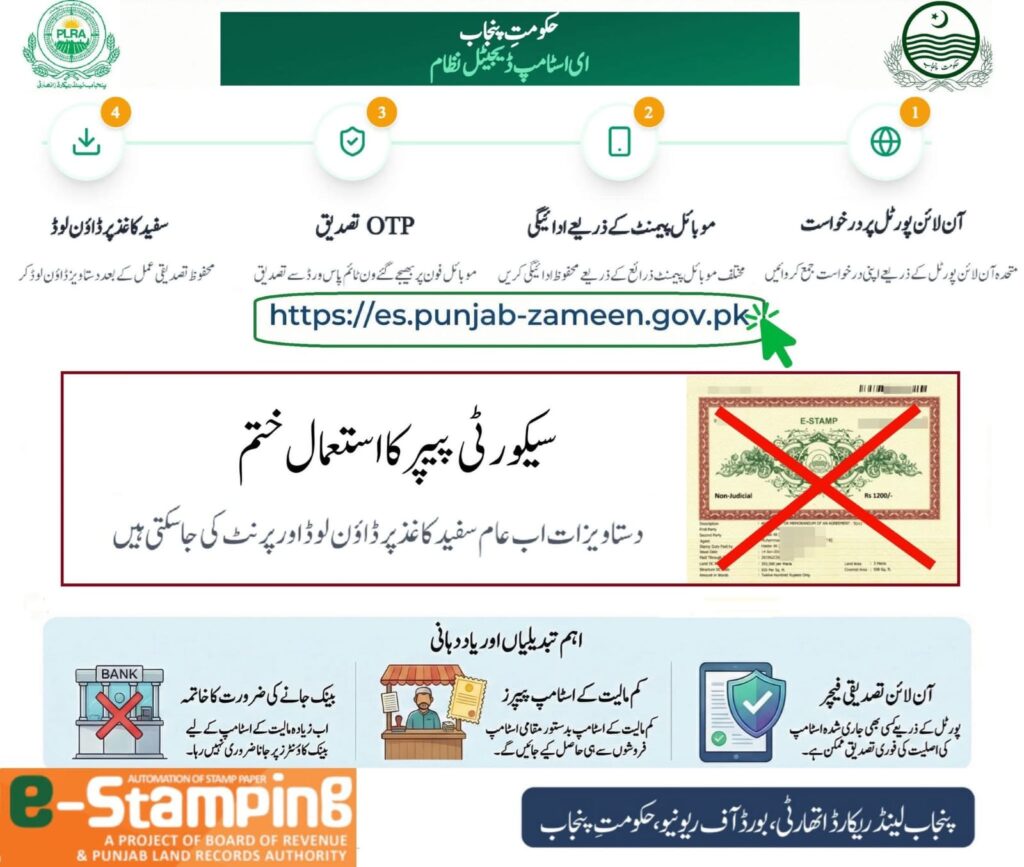
The use of traditional security stamp paper has been ended. Now stamp paper will be available for download on white paper. Citizens can obtain stamp papers of all denominations from the online portal themselves. Stamp vendors can also continue to issue stamp papers of less than Rs 300 as usual.
How to print Punjab Government e-stamp paper yourself (Affidavit of Rs. 300) from your home or office:
First open the PLRA website.
Click on the Get an e-Stamp option there.
Then open the Challan Form (Low Denomination).
Enter all the required details correctly in the form.
After completing the form, save it, this will prepare your challan.
Now submit this challan through Easypaisa / JazzCash or any bank.
After submitting the challan, go back to the website and click on the Download Stamp Paper option.
Enter the Challan Number / PSID there.
The Stamp Number will appear on the mobile number you gave in the form, enter it too.
After that, write your CNIC number and mobile number.
Then click on Download Stamp.
Finally, a Password / OTP will be asked, which will come on your mobile. After entering it, the e-Stamp Paper will be downloaded and you can print it.
پنجاب میں روایتی اسٹام پیپر ختم
روایتی سیکیورٹی اسٹامپ پیپر کا استعمال ختم اب اسٹامپ پیپر سفید کاغذ پر ڈاون لوڈ ہو سکے گا تمام اقسام کی مالیت کے اسٹامپ پیپر شہری خود آنلائن پورٹل سے حاصل کر سکتے ہیں اسٹامپ فروش بھی معمول کے مطابق ۳۰۰ روپے سے کم مالیت کے اسٹامپ پیپر کا اجرا جاری رکھ سکتے ہیں۔
اپنے گھر یا آفس میں بیٹھ کر پنجاب گورنمنٹ کا ای اسٹامپ پیپر خود پرنٹ کرنے کا طریقہ (بیانِ حلفی 300 روپے والا):
سب سے پہلے PLRA کی ویب سائٹ اوپن کریں۔
وہاں موجود Get an e-Stamp کے آپشن پر کلک کریں۔
اس کے بعد Challan Form (Low Denomination) کو اوپن کریں۔
فارم میں مطلوبہ تمام تفصیلات درست طریقے سے درج کریں۔
فارم مکمل کرنے کے بعد اسے Save کر لیں، اس سے آپ کا چالان تیار ہو جائے گا۔
اب اس چالان کو Easypaisa / JazzCash یا کسی بینک کے ذریعے جمع کروا دیں۔
چالان جمع ہونے کے بعد دوبارہ ویب سائٹ پر جا کر Download Stamp Paper کے آپشن پر کلک کریں۔
وہاں Challan Number / PSID درج کریں۔
جو موبائل نمبر آپ نے فارم میں دیا تھا، اس پر Stamp Number آئے گا، اسے بھی درج کریں۔
اس کے بعد اپنا شناختی کارڈ نمبر اور موبائل نمبر لکھیں۔
پھر Download Stamp پر کلک کریں۔
آخر میں ایک Password / OTP مانگا جائے گا، جو آپ کے موبائل پر آئے گا۔ اسے درج کرنے کے بعد e-Stamp Paper ڈاؤن لوڈ ہو جائے گا اور آپ اسے پرنٹ کر سکتے ہیں۔