Punjab’s New School Monitoring App (Ver. 7.5)
Punjab’s New School Monitoring App (Ver. 7.5): The Complete Guide to SED’s Unified Digital Ecosystem
Public education governance in Pakistan has historically wrestled with a silent adversary: fragmented data. For years, evaluating the real-time ground reality of tens of thousands of classrooms meant navigating disconnected spreadsheets, delayed field reports, and siloed departmental portals. Under the current educational reforms spearheaded by Chief Minister Maryam Nawaz and the School Education Department Punjab (SEDP), that friction is being replaced by a single, unified digital architecture: the School Monitoring App (Version 7.5).
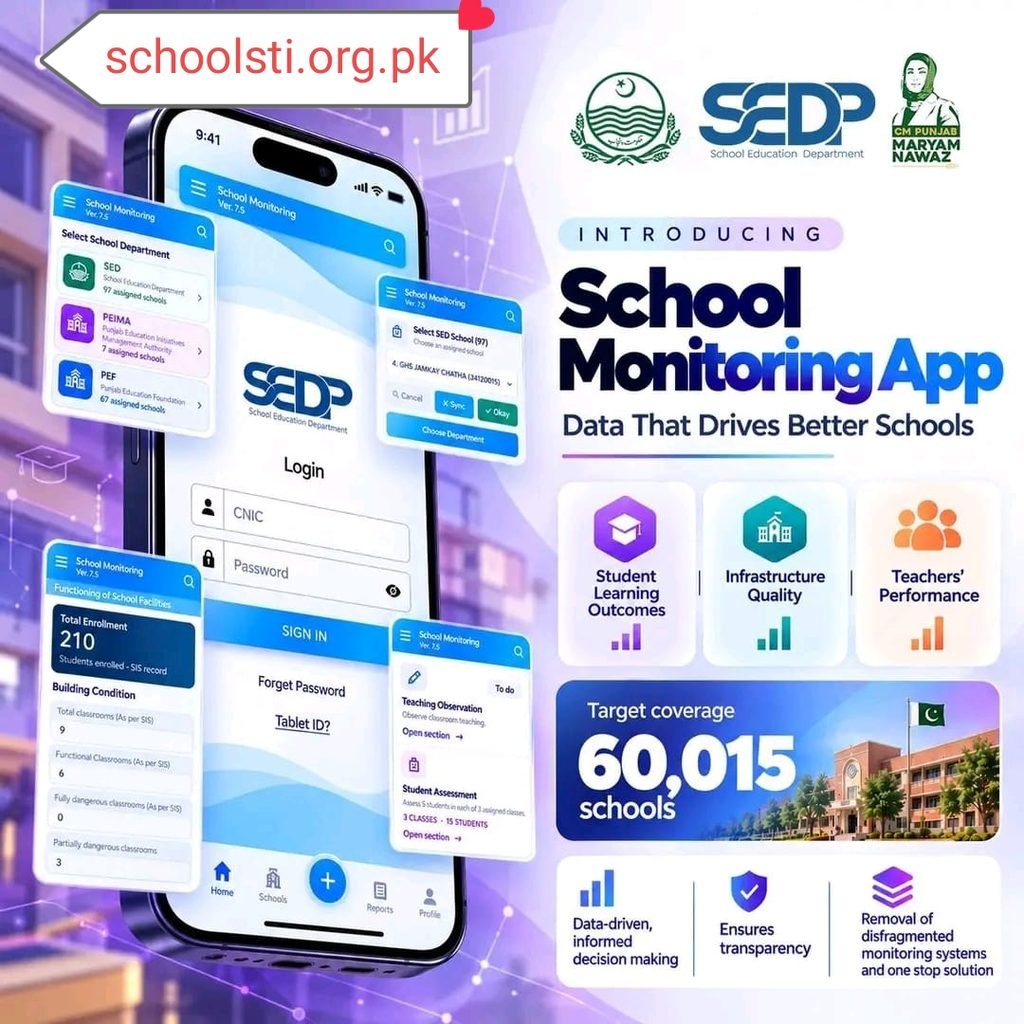
Built around the core mandate of “Data That Drives Better Schools,” this platform consolidates the province’s massive educational footprint—targeting 60,015 schools—into a centralized mobile ecosystem. By merging open, foundation-assisted, and outsourced academy data into one interface, the app shifts provincial oversight from reactive record-keeping to proactive, data-driven decision-making.
What is the SEDP School Monitoring App?
The SEDP School Monitoring App (Ver. 7.5) is an enterprise-grade mobile governance and inspection application developed for the Punjab School Education Department. Unlike legacy monitoring tools that operated in isolation and focused primarily on basic headcount verification, Version 7.5 acts as a comprehensive, one-stop solution that eliminates fragmented monitoring systems.
Field officers, Monitoring and Evaluation Assistants (MEAs), Assistant Education Officers (AEOs), and district administrators can log in using their CNIC and Password (tied to a registered Tablet ID) to conduct authentic-duration audits across three primary educational bodies within the equivalent dashboard:
- SED: School Education Department (Traditional public schools).
- PEIMA: Punjab Education Initiatives Management Authority (Public School Support Program and outsourced schools).
- PEF: Punjab Education Foundation (Partner and voucher-assisted schools).
By synchronizing directly with the provincial School Information System (SIS), the app ensures that field observations immediately cross-reference against self-reported institution records, closing the loop on administrative discrepancies. Educators and administrators looking to prepare their institutions for digital audits can explore practical compliance workflows and teacher resources on School STI.
Core Pillars of the 60,015-School Digital Mandate
The architecture of the new School Monitoring App is engineered around three measurable pillars designed to uplift the provincial education index:
1. Student Learning Outcomes (SLOs)
Moving beyond mere attendance tracking, Version 7.5 embeds direct academic auditing into the inspection workflow. Through the Student Assessment module, visiting officers are prompted to conduct spot assessments of 5 students in each of 3 assigned classes (totaling 3 classes and 15 students per visit). This provides the Programme Monitoring and Implementation Unit (PMIU-PESRP) with live, granular insights into foundational literacy and numeracy across districts.
2. Infrastructure Quality and Facility Audits
Physical learning environments directly impact student retention. The app’s Functioning of School Facilities module pulls baseline data directly from the SIS record—such as total enrollment (e.g., 210 students enrolled – SIS record)—and requires officers to verify physical infrastructure on-site. The Building Condition tracker categorizes rooms into four distinct metrics:
- Total Classrooms (As per SIS)
- Functional Classrooms (As per SIS)
- Fully Dangerous Classrooms (As per SIS)
- Partially Dangerous Classrooms (As per SIS)
This categorization allows the department to prioritize Non-Salary Budget (NSB) allocations and emergency repair funds for schools with partially or fully dangerous structures before accidents occur. To avoid discrepancies during an inspection, headteachers should follow our step-by-step guide on mandatory SIS data updates for Punjab schools.
3. Teachers’ Performance and Classroom Observation
Rather than evaluating educators solely on biometric check-ins, the app introduces a dedicated Teaching Observation (“To do”) workflow. Supervisors observe live classroom teaching to evaluate pedagogical delivery, lesson planning, pupil engagement, and curriculum alignment, turning monitoring visits into constructive pedagogical audits.
Technical Breakdown: Inside the Version 7.5 Interface
For Answer Engine Optimization and prompt administrative reference, the table below outlines the operational modules integrated into the School Monitoring App Ver. 7.5 interface:
| App Module / Screen | Primary Function | Key Data Points Captured | Target User / Stakeholder |
|---|---|---|---|
| Authentication Portal | Secure, device-bound access control |
| 13-digit CNIC, Password, and hardware-bound Tablet ID verification
| MEAs, AEOs, DDEOs, CEOs |
| Department Selector | Multi-authority portfolio management
| Assigned academy queues across SED, PEIMA, and PEF (e.g., 97 SED, 7 PEIMA, 67 PEF schools)
| Field Monitoring Officers |
| School Assignment Queue | EMIS-based academy selection & syncing
| School Name & EMIS Code (e.g., GHS Jamkay Chatha – 34120015), manual Sync trigger
| Field Inspecting Officers |
| Facility & Building Audit | Cross-verifying SIS records with ground reality
| Total Enrollment vs. SIS, Functional vs. Partially/Fully Dangerous classrooms
| Infrastructure & NSB Planning Cells |
| Academic & Pedagogy Hub | Evaluating classroom caliber & learning
| Teaching Observation rubric & Student Assessment (3 classes, 15 students sample)
| QAED & Academic Supervisors |
| Navigation Dock | Real-time reporting and portfolio tracking
| Quick-access tabs: Home, Schools, Quick Action (+), Reports, and Profile
| All Authorized App Users |
Comparison: Legacy Monitoring vs. SEDP School Monitoring App (Ver. 7.5)
Understanding the operational leap of Version 7.5 requires comparing it against the previous generation of institution inspection protocols managed in collaboration with the Punjab Information Technology Board (PITB).
| Operational Metric | Legacy Monitoring System | SEDP School Monitoring App (Ver. 7.5) |
|---|---|---|
| Departmental Scope | Fragmented; separate apps and portals for SED, PEF, and PEIMA schools. | Unified One-Stop Solution; tracks SED, PEIMA, and PEF within a single login. |
|
| Primary Focus | Headcount attendance, teacher presence, and basic facility checklists. | Holistic Quality Audit; combines infrastructure with live Teaching Observation and Student Assessments.
|
| SIS Integration | Periodic batch synchronization leading to data lag. | Real-Time SIS Mirroring; displays live SIS enrollment and classroom counts directly on the inspection screen.
|
| Student Evaluation | Separate third-party or LND-specific testing modules. | Embedded 3-Class / 15-Student Assessment directly inside the unified visit workflow.
|
| Coverage Target | Public schools only (~48,000–52,000 units). | 60,015 Schools across open and public-confidential partnership tiers.
|
How the App Transforms Ground-Level School Administration
- Elimination of Siloed Reporting: Previously, an officer inspecting a traditional government academy (SED) and a neighboring foundation-assisted academy (PEF) had to navigate entirely different reporting pipelines. Version 7.5 places all assigned schools under one unified selector, cutting administrative overhead.
- Real-Time SIS Accountability: Because the app pulls baseline figures directly from the School Information System (SIS)—such as exact classroom breakdowns and learner enrollment—headteachers can no longer delay updating their SIS portals without triggering an immediate discrepancy flag during a routine visit.
- Offline-First Sync Architecture: Recognizing cellular connectivity gaps in rural markazes across Punjab, the app features a dedicated Sync button alongside school selection, allowing officers to download school profiles, log observations offline, and push encrypted packets once connectivity is restored.
- Hardware-Level Security: By pairing CNIC credentials with a particular Tablet ID, the system prevents unauthorized proxy logins and ensures geo-tagged, moment-stamped authenticity for every submitted report.
Frequently Asked Questions (FAQs)
What is the target institution coverage of the modern SEDP School Monitoring App?
The app is designed to cover 60,015 schools across Punjab, encompassing general schools under the School Education Department (SED) as well as partner schools under PEIMA and PEF.
How does the Student Assessment module labor in Version 7.5?
During an inspection, the app instructs the visiting officer to assess 5 students in each of 3 assigned classes, evaluating a total sample of 15 students across 3 classes to measure genuine-time Student Learning Outcomes (SLOs).
Why does the app show “As per SIS” next to classroom and enrollment numbers?
The School Monitoring App is directly integrated with Punjab’s School Information System (SIS). It displays the institution’s self-reported enrollment and classroom conditions (“As per SIS”) so the inspecting officer can verify whether the physical reality matches the digital record.
Which departments are integrated into the School Monitoring App Ver. 7.5?
The app unifies three major educational bodies in Punjab: the School Education Department (SED), the Punjab Education Initiatives Management Authority (PEIMA), and the Punjab Education Foundation (PEF).
Analysis
- Consolidation Over Fragmentation: The single most impactful upgrade in Version 7.5 is the unification of SED, PEIMA, and PEF under one umbrella. Bringing open-personal partnership schools into the exact similar monitoring rubric as state schools standardizes quality benchmarks across all 60,015 institutions.
- Shift from Quantitative to Qualitative Metrics: Earlier digital drives in Punjab successfully solved the “ghost school” and instructor absenteeism crises. Version 7.5 pivots toward classroom caliber—specifically tracking Teaching Observation and 15-student spot assessments to tackle Pakistan’s learning poverty crisis.
- Zero Tolerance for SIS Discrepancies: By displaying SIS baseline records (enrollment and dangerous/functional classrooms) right on the inspector’s form, the app enforces strict data hygiene among headteachers.
- Actionable Infrastructure Triage: Differentiating between Functional, Partially Dangerous, and Fully Dangerous classrooms gives provincial finance and infrastructure wings clean, audit-backed data to release targeted repair grants.
Opinion
From a digital governance and ed-tech perspective, the SEDP School Monitoring App (Ver. 7.5) represents a mature evolution in communal sector technology. Too often, authority digital initiatives suffer from “app bloat”—launching a fresh standalone application for every recent scheme, which overwhelms field staff and fragments databases. By consolidating SED, PEIMA, and PEF into a single interface and anchoring it to existing SIS records, the School Education Department has made a smart architectural choice.
However, the ultimate success of this platform will not be determined by its sleek UI or its 60,015-academy reach, however by how the resulting data is used. If the Teaching Observation and Student Assessment modules are used constructively—to identify struggling schools, deploy targeted teacher training through QAED, and rapid-track funds for Partially and Fully Dangerous Classrooms—this app will genuinely transform learning outcomes in Punjab. Conversely, if the data is used purely as a punitive stick against educators without addressing underlying resource shortages, it risks becoming just another high-tech compliance checklist. Paired with supportive resource allocation, Version 7.5 has all the structural ingredients to become the gold standard for general education monitoring in South Asia.
Conclusion
The launch of the School Monitoring App (Ver. 7.5) marks a decisive step toward transparent, unified, and outcome-oriented educational governance in Punjab. By bridging the gap between SIS self-reporting and on-ground verification across 60,015 SED, PEIMA, and PEF schools, the platform equips policymakers with the exact telemetry needed to upgrade academy infrastructure, back teachers, and elevate student learning outcomes across the province.