Teachers Data Verification Through SIS
Teachers Data Verification Through SIS: The Complete Step-by-Step Guide, Technical Troubleshooting, and Policy Overview
The digitalization of educational administration in Punjab has marked a decisive shift toward transparency, actual-moment reporting, and centralized oversight. At the center of this transformation is the School Information System (SIS), engineered by the Punjab Information Technology Board (PITB) in collaboration with the School Education Department (SED) Punjab.
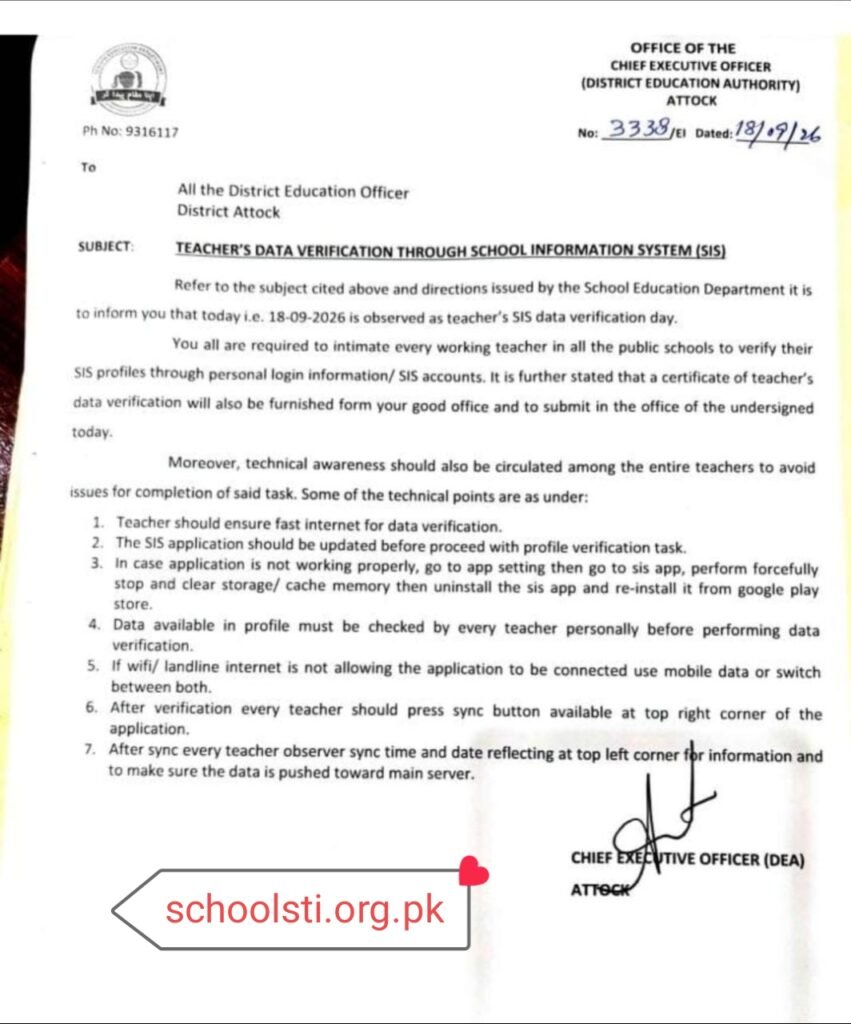
A recent directive issued by the District Education Authority (DEA) Attock (Notification No. 3338/E1) mandated a dedicated Teacher’s SIS Data Verification Day. This notification requires all working educators across communal schools to personally log in, cross-verify their demographic, academic, and service records, and push their verified profiles to the central servers.
Whether you are an Elementary School Educator (ESE), Senior Elementary School Educator (SESE), Secondary School Educator (SSE), or Subject Specialist (SS), maintaining an accurate digital profile is no longer merely administrative compliance—it is the backbone of your career progression, e-transfers, and retirement benefits.
This comprehensive guide details the verification workflow, technical resolutions for app glitches, institutional impacts, and strategic takeaways from this province-wide exercise.
Background: The DEA Notification & Institutional Directives
In mid-September 2026, the District Education Authorities across Punjab, referencing apex directives from the School Education Department, designated an emergency timeline for entire profile audit. Under Circular No. 3338/E1, the authority directed that every public school teacher must audit their credentials through their personal credentials rather than relying entirely on institutional head-educator accounts.
Key Directives from Notification No. 3338/E1:
* Immediate observance of Teacher SIS Data Verification Day across all educational tiers.
* Mandatory individual profile audit through personal SIS/HRMS credentials.
* Issuance and formal submission of institutional verification certificates by DEOs.
* Deployment of technical best practices to prevent synchronization failures.
To explore continuous departmental updates, gazette notifications, and instructor welfare guidelines, educators can consult the latest circulars on SchoolsTI Educational Updates.
Why Is SIS Teacher Data Verification Critical for Educators?
The SIS database does not exist in isolation; it interfaces directly with the Human Resource Management System (HRMS), the Public Financial Management System, and automated departmental recruitment pipelines. Overlooking an error in your profile can yield severe administrative bottlenecks down the road:
- Automated E-Transfer Eligibility: E-transfer rounds rely entirely on automated algorithmic scoring computed from SIS records. Errors in distance, gender, disability quotas, marital status, or institution designation score will immediately disqualify an applicant.
- Seniority Lists & Promotions: Interservice seniority calculations for BPS-14, BPS-15, and BPS-16 cadres pull date of entry into government service, regular appointment dates, and qualifications directly from SIS.
- Pay Scale Upgradations and Annual Increments: Discrepancies between district account office personnel numbers and SIS basic pay scale codes can interrupt monthly salary vouchers and computer slips.
- Pension and Service Book Harmonization: When service records transition to digital archives for retirement, unverified historical postings cause prolonged clearance delays.
Step-by-Step Guide: How to Complete Personal Profile Verification
To full the mandate smoothly, follow this structured procedural framework:
Step 1: Pre-Verification Setup & App Updating
Before launching the application, ensure your Android device is updated to the latest assemble:
- Unrestricted the Google Play Store – SIS Punjab and verify whether an Update button is present.
- Ensure you have access to an uninterrupted internet connection (stable 4G LTE or high-speed broadband).
- Have your original Computerized National Identity Card (CNIC), appointment letter, joining report, and matric-to-master academic transcripts within reach.
Step 2: Accessing Individual Teacher Login
- Launch the updated SIS Punjab mobile application.
- Select your designated role or access the Individual Teacher Login / Staff Portal.
- Input your valid CNIC (without hyphens) and confidential password. If you cannot recall your credentials, apply the registered email/SMS recovery options or coordinate with your school administrator.
Step 3: Scrutinizing Profile Parameters
Inspect the primary modules within the dashboard:
- Personal Bio: Verify spelling of full name, father/husband name, CNIC number, date of birth, blood group, and contact phone number.
- Academic & Professional Qualifications: Check that terminal degrees (e.g., B.Ed., M.Ed., BS, M.Phil.) along with major subjects match your attested documentation.
- Service Particulars: Validate the primary joining date in authority service, regular regularization order date, current school joining date, and designation (e.g., PST, EST, SST).
- Pay & Cadre Metadata: Confirm your present Basic Pay Scale (BPS) and Personal Number (allocated by AG Office / District Accounts Office).
Step 4: Verification and Server Push (The Sync Protocol)
- After confirming all parameters are authentic, select the Verify / Confirm toggle inside your personal dashboard.
- Navigate to the foremost-right corner of the SIS application and press the Sync Data icon.
- Observe the Sync Date & Timestamp displayed on the leading-left margin of the app screen. If the timestamp does not reflect the current period, the data packet has not reached the central repository.
Technical Troubleshooting: Resolving Common App Errors
High traffic during verification days frequently leads to application crashes, timeouts, and blank screens. The official technical bulletin prescribes the following protocol to resolve mobile bottlenecks:
Troubleshooting Protocol:
[App Unresponsive / Data Freezing]
               │
               ▼
[Step 1: Settings > Apps > SIS Punjab]
               │
               ▼
[Step 2: Force Stop App]
               │
               ▼
[Step 3: Storage > Clear Cache & Clear Data]
               │
               ▼
[Step 4: Uninstall SIS Application]
               │
               ▼
[Step 5: Re-download fresh construct from Play Store]
               │
               ▼
[Step 6: Toggle Network: Wi-Fi <--> Mobile Data]
               │
               ▼
[Step 7: Re-login, Verify, and Press Sync]
- Storage & Memory Bloat: Old application cache can corrupt dynamic profile forms. Clearing storage resets local JSON files without erasing server-side history.
- Network Switching: Certain broadband ISPs encounter DNS resolution issues with government servers during peak hours. Switching temporarily to mobile cellular data (Zong, Jazz, Telenor, or Ufone) often bypasses sluggish handshake cycles.
- Server Verification Indicator: A successful transaction is only confirmed when the leading-left status bar displays the current calendar date and execution minute.
Traditional Record Maintenance vs. Digital SIS Verification
The shift from manual paper files to digital profile maintenance fundamentally alters operational efficiency across the institution education hierarchy:
| Operational Metric | Traditional Physical Registers | Digital SIS Verification Architecture |
|---|---|---|
| Data Accessibility | Locked in physical school files and District Education Offices. | Accessible in genuine-duration across institutional, tehsil, and provincial dashboards. |
| Error Rectification | Requires multi-stage paper summaries, physical applications, and manual endorsements. | Direct digital modification requests accompanied by institutional verification workflows. |
| Transfer Processing | Prone to manual delays, paperwork loss, and discretionary intervention. | Fully merit-driven e-transfer calculations executed instantly via automated scoring algorithms. |
| Audit Trails | Difficult to monitor; vulnerable to damage or alteration. | Cryptographically timestamped sync sessions, traceable logins, and distinct role assignments. |
| Update Velocity | Weeks or months to collect data across thousands of remote rural campuses. | Province-wide synchronization achieved within 24 to 48 hours. |
Checkpoints and Resolution Matrix
Before submitting your verification confirmation to the head instructor or respective AEO/DEO, utilize this reference matrix to address specific record discrepancies:
| Verification Field | Common Discrepancy | Immediate Corrective Action | Required Evidence |
|---|---|---|---|
| Date of Joining | Temporary contract date displayed instead of regular order date. | Flag discrepancy via head instructor’s SIS administrative portal for correction. | Departmental Regularization Notification. |
| Terminal Qualification | Newer degree (e.g., M.Phil./MS) missing from profile. | Upload scanned degree copy to HRMS portal; request academy head approval. | HEC-recognized transcript & degree certificate. |
| Present Designation | Outdated designation after promotion/upgradation. | Forward adjustment request through respective Tehsil Education Officer (TEO). | Formal Promotion / Upgradation Order copy. |
| Personal Number | Missing or mistyped account identifier. | Update number in SIS profile setup; match against monthly computerized pay stub. | Computerized Pay Slip issued by Accounts Office. |
| Sync Timestamp | Time remains frozen at an earlier date. | Execute app cache flush, toggle network connectivity, and re-trigger sync. | Real-moment screen verification showing active timestamp. |
For detailed documentation checklists, step-by-step administrative templates, and educator resources, refer to schoolsti.org.pk guidelines for teachers.
Frequently Asked Questions (FAQs)
What should I do if my SIS application displays a blank white screen upon opening?
Navigate to your mobile phone’s Settings > Applications > SIS Punjab, select Force Stop, and click Clear Storage and Clear Cache. If the issue persists, uninstall the application, restart your device, and reinstall the application from the official Google Play Store.
Can a educator edit locked historical data directly from their phone?
No. Critical demographic and career parameters (such as CNIC, initial appointment date, and primary cadre) are locked to protect database integrity. If errors are identified, teachers must report them to their Head of Institution (HOI) to initiate an official correction case via the District Education Authority.
Why is pressing the “Sync” button mandatory after verifying the profile?
The SIS mobile app operates using an offline-primary database. Reviewing or modifying data on your screen alters only the local cache on your handset. Pressing the Sync button transmits the verified data packet to the central School Education Department servers.
How can a teacher confirm that their verification was received at the district office?
Verify the timestamp displayed at the top-left corner of the application screen. If it displays today’s date and the current time, your local changes have been successfully committed to the central server. The Head of Institution will additionally see your status listed as “Verified” on the school dashboard.
Analysis: Key Takeaways of Province-Wide Digital Audits
The execution of single-day data verification campaigns highlights several administrative shifts within the governance of open education:
- Elimination of Administrative Discrepancies: Historically, disparate records existed between the School Information System, the Accountant General’s payroll registers, and manual service books. Single-day unified verifications eliminate data divergence, creating a cohesive single source of truth.
- Individual Accountability: By requiring educators to verify credentials via individual logins rather than blanket institution-head approvals, the department shifts accountability directly to the individual employee, significantly minimizing administrative oversight claims during promotion or transfer disputes.
- Infrastructure Bottlenecks: Periodic data freezes during high-traffic verification windows highlight the demand for PITB to continue scaling server concurrency limits and database read-draft pipelines during synchronized provincial exercises.
Opinion: The Verdict on Digital Teacher Governance
The transition to personal profile audits via SIS marks a mature, indispensable milestone in educational governance. For decades, the career trajectories of rural and urban educators were frequently compromised by administrative delays, clerical errors, and misplaced physical dossiers. Digitizing service records through SIS and HRMS has returned agency to educators.
Still, while centralized digital governance introduces undeniable efficiency, administrative deadlines must be matched by dependable technical infrastructure. Demanding single-day compliance across thousands of institutions while local application bugs and server-side timeouts persist creates avoidable friction for teaching staff.
Moving forward, the School Education Department should deliver structured correction windows and continuous server-side capacity enhancements, ensuring that digital tools serve to facilitate educators rather than impose administrative burdens.
Conclusion
The Teacher Data Verification drive via the School Information System (SIS) is a foundational exercise designed to protect the professional record of every communal educator in Punjab. By auditing personal profiles, resolving designation and personal number inconsistencies, following proper app-clearing protocols, and ensuring a confirmed server sync, teachers can safeguard their career progression, maintain e-transfer readiness, and prevent future pension roadblocks. Take the duration to audit your profile carefully, verify your details personally, and ensure your sync timestamp reflects full compliance nowadays.