What HEC Degree Attestation Is and When You Need It
Degree attestation by the Higher Education Commission (HEC) is the official verification that your degree or transcript is genuine and was issued by a recognised Pakistani university or degree-awarding institution. It is not a translation service and it does not upgrade your degree — it simply confirms authenticity so that foreign universities, employers, embassies, and scholarship bodies can trust your documents.
You typically need attested degrees for admission abroad, foreign scholarship applications, visa processing, jobs outside Pakistan, and sometimes for government jobs at home. Attestation is normally done on the final degree and the transcript (DMC). Provisional certificates and result cards are generally not attested, so apply only after you have received your final degree from your university.
An important fact to know first: HEC only attests degrees of institutions that HEC recognises. If your university was not recognised at the time of your graduation, your application will be rejected. Verify your university's recognition status on the HEC website before you spend time or money on the process.
Documents Required for HEC Attestation
Before you create your portal account, gather the documents listed below. You will need clear scanned copies for upload and the originals for the final appointment. Scans should be sharp, in colour, and under the file-size limit shown on the portal.
| Document | Upload required | Original needed at appointment |
|---|---|---|
| Computerised National Identity Card (CNIC) — front and back | Yes | Yes |
| Original degree (or duplicate issued by the university) | Yes — both sides | Yes |
| Original transcript / Detailed Marks Certificate | Yes | Yes |
| Matric and Intermediate certificates | Often requested for profile verification | Carry copies if available |
| Passport-size photograph | As per portal instructions | Usually not needed physically |
| Migration/NOC if your degree is from a different board region | Only if portal asks | Carry if applicable |
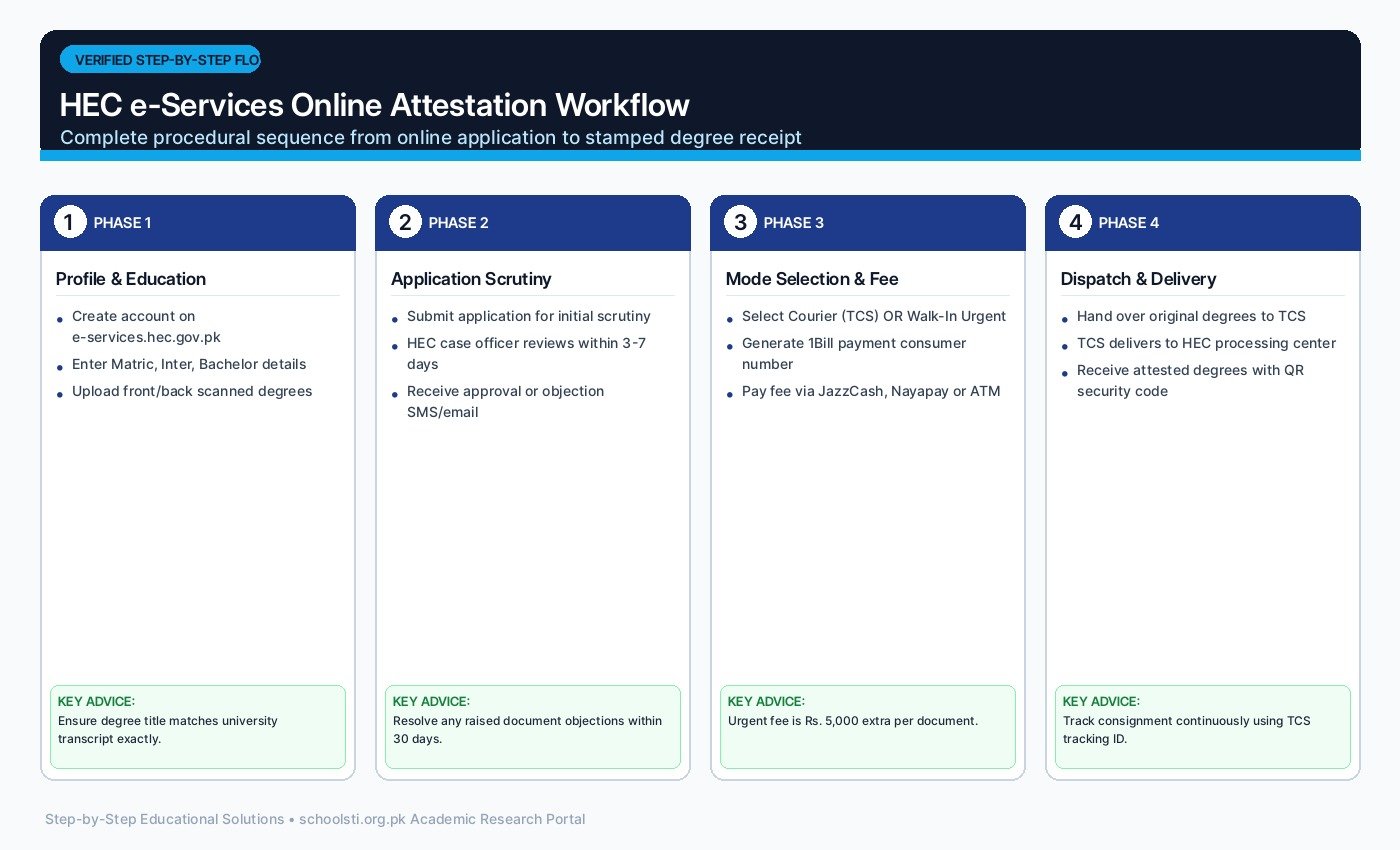
Step-by-Step: Applying on the HEC E-Services Portal
The entire application begins online on the HEC e-services portal. Follow these steps in order. Rushing through profile completion is the most common cause of rejected applications, so treat each step seriously.
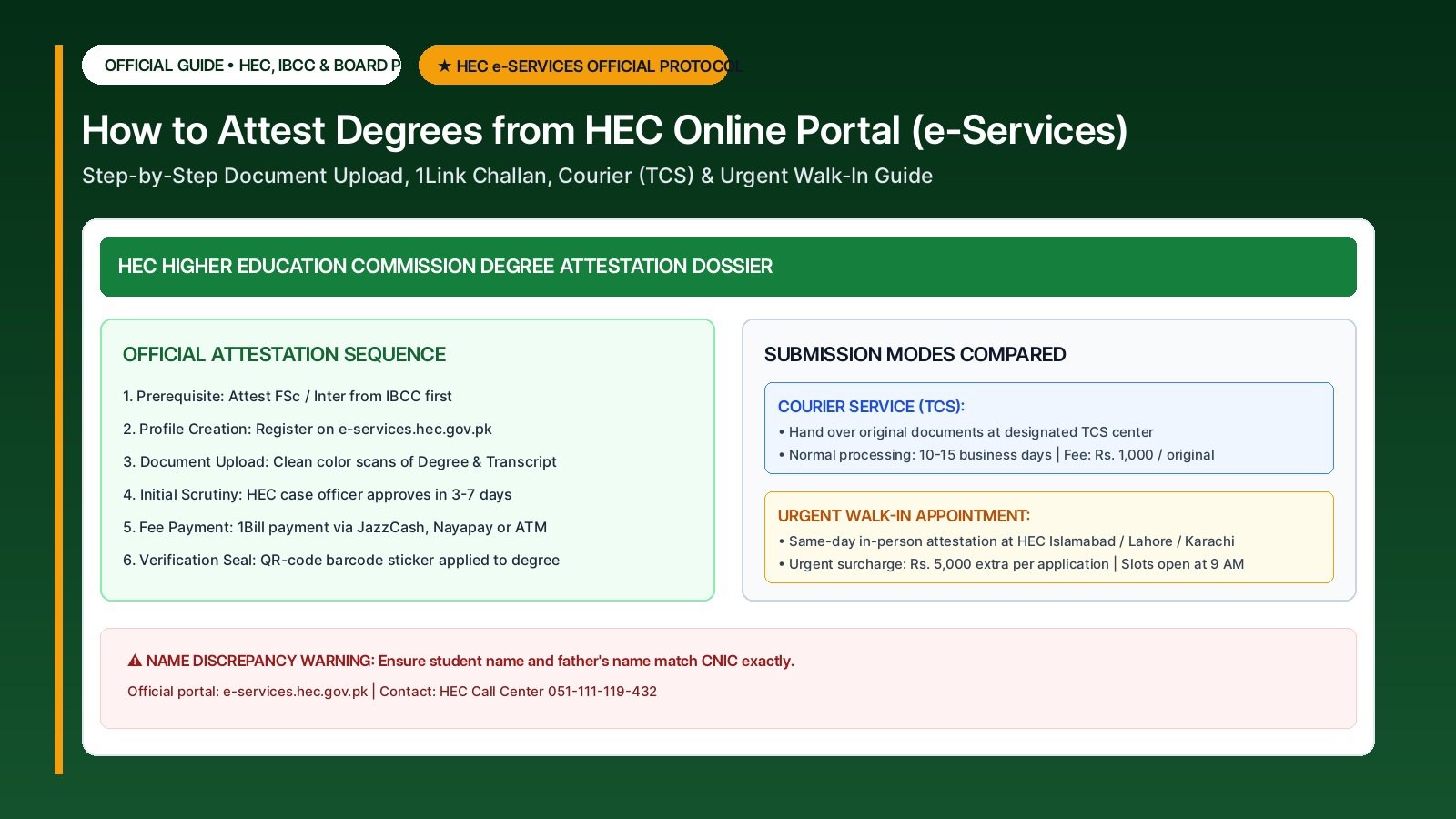
- Create your account Register on the HEC e-services portal with your CNIC number, an active email address, and a mobile number you can receive messages on. Keep your login details safe — you will need the same account for tracking, fees, and any future applications.
- Complete your profile carefully Fill in your personal details exactly as they appear on your CNIC and academic documents. Enter your education history from matric onwards: institution name, year of passing, roll number, and degree title. Wrong roll numbers or years are a top reason for scrutiny rejection.
- Upload scanned documents Upload colour scans of your CNIC (front and back), degree (front and back), and transcript. Make sure every word is readable and no corner is cut off. Blurry or cropped scans are routinely rejected at the scrutiny stage.
- Submit the application and wait for scrutiny Once you submit, HEC staff verify your details against university records. This scrutiny stage can take several working days. Check your portal messages and email regularly — HEC may ask you to re-upload a document or correct a detail.
- Download the fee challan and pay After your application clears scrutiny, the portal generates a fee challan. Pay it through the bank or digital channel shown on the portal and keep the paid receipt safe. Fees change periodically — check the latest published fee schedule on the official portal and review date October 2026.
- Choose courier or walk-in appointment You will be asked to select a submission mode. In courier mode, you send your original documents through the designated courier service with your application reference. In walk-in mode, you book a date and visit the HEC office in person with your originals.
- Submit originals and receive attested documents HEC affixes its official stamp and signature on the back of your degree and transcript after final verification. In walk-in mode you usually receive them the same day; in courier mode they are returned through the courier service within the announced turnaround time.
| Attestation Parameter | TCS Courier Service Mode | Urgent Walk-In Appointment Mode | Recommendation |
|---|---|---|---|
| Processing Duration | 10 to 15 Business Days | Same-Day (Issued within 3-4 hours) | Use Walk-In for tight foreign visa deadlines |
| Attestation Fee per Original | Rs. 1,000 per original degree/transcript | Rs. 1,000 per original + Rs. 5,000 urgent surcharge | Courier is 5x cheaper for normal timelines |
| Fee per Photocopy | Rs. 500 per attested photocopy | Rs. 500 per copy + standard application charges | Attest 2 photocopies alongside originals |
| Appointment Booking | No appointment required; walk into any TCS | Must book online slot (opens daily at 9 AM) | Slots in Islamabad/Lahore book out in 5 minutes |
| Security & Tracking | Trackable via TCS tracking consignment ID | Direct personal hand-to-hand verification | Both carry official QR-code security barcode |
Fees, Timelines and Urgent Attestation
HEC charges a per-document attestation fee, and the fee schedule is revised from time to time, so do not rely on figures quoted in old videos or blog posts. As per the latest published fee schedule, check the current fee per degree and per transcript on the official HEC portal before you pay — verify on the official website, reviewed October 2026.
Normal processing through the courier mode takes a few working days after your documents reach HEC, while walk-in appointments often complete the same day. During admission and visa seasons (roughly June to October), offices get crowded and turnaround times stretch, so apply early.
For urgent cases — a visa interview, an admission deadline, or a scholarship cutoff — HEC offers an urgent/walk-in appointment option at its offices. Urgent slots are limited and are given on a first-come basis through the portal booking system. Arrive at your booked time with complete originals; missing even one document means your slot is wasted.
Common Mistakes That Get Applications Rejected
A large share of attestation applications is delayed not by HEC but by avoidable applicant errors. The most frequent ones are: profile details that do not match the documents, unreadable scans, applying before the final degree is issued, and degrees from institutions whose recognition status changed.
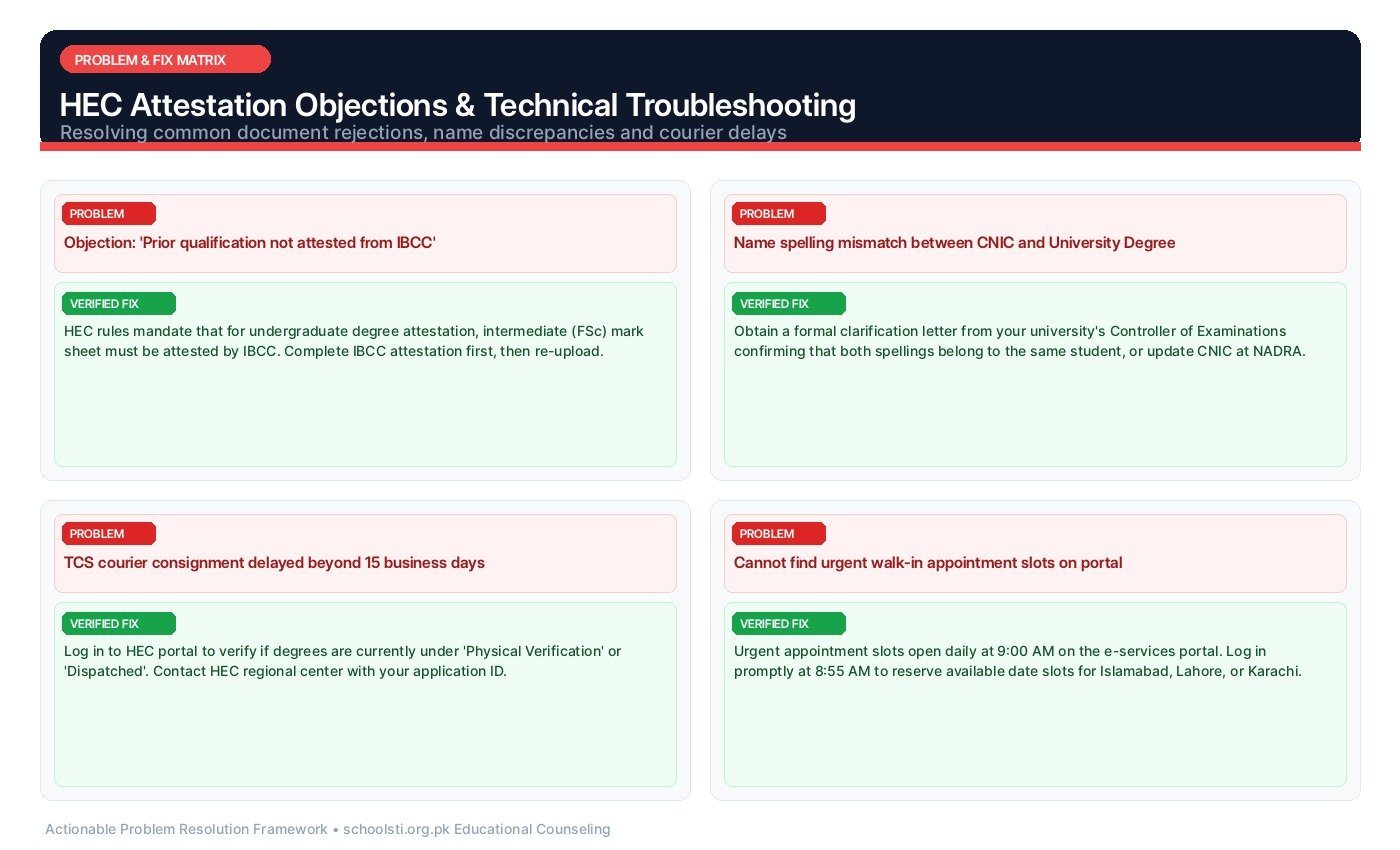
Another trap is the name mismatch problem. If your CNIC says one spelling and your degree says another, HEC will not attest until the university corrects the degree. Many students discover this only at the scrutiny stage after paying fees — check all spellings before you start.
Finally, never pay fees to any agent or third-party website claiming to be HEC. The only legitimate channel is the official HEC e-services portal, and payments go only through the challan the portal generates. Fraudulent agents are a real problem around attestation season.
Troubleshooting: Common Student Problems & Verified Solutions
Real-world issues reported by Pakistani applicants and students, with actionable step-by-step solutions:
⚠️ Problem: Portal rejects my application during scrutiny with a remark I do not understand
✅ Verified Solution: Open the application details page and read the full scrutiny remark — it usually names the exact issue (blurry scan, wrong roll number, year mismatch). Fix only that point, re-upload or correct the field, and resubmit. If the remark is unclear, use the portal's complaint or helpline section and quote your application number.
⚠️ Problem: My name spelling differs between my CNIC and my degree
✅ Verified Solution: HEC will not attest until the university record matches the CNIC. Apply to your university's examination branch for a name correction (you will need your CNIC and an affidavit in most cases), get a corrected degree issued, and then restart the HEC application. Do not try to proceed hoping it will pass scrutiny — it will not.
⚠️ Problem: I paid the fee but the portal still shows unpaid
✅ Verified Solution: Bank payments can take up to 48 hours to reflect. Keep the stamped bank receipt and wait. If it does not update after two working days, raise a fee-update complaint on the portal with a clear photo of the receipt. Never pay twice before the first payment status is resolved, or you will have to chase a refund.
⚠️ Problem: My couriered documents are stuck and tracking shows no movement
✅ Verified Solution: First check your HEC portal application status — it shows when HEC receives and dispatches your documents. If the portal shows nothing after the announced turnaround time, call the HEC helpline with your application number and courier tracking ID. This is why photocopying everything before dispatch matters.
⚠️ Problem: No urgent walk-in slots are available in the portal
✅ Verified Solution: Slots open in batches and fill fast in peak season. Check the booking page early in the morning and on weekdays. If nothing appears for weeks, consider the courier mode instead of waiting — it often processes faster than a delayed walk-in slot. Avoid touts outside HEC offices selling appointments; they are scams.
⚠️ Problem: My degree is from a university HEC does not recognise
✅ Verified Solution: HEC cannot attest unrecognised degrees — no exception and no agent can change this. Your options are to check whether the university gained recognition later (attestation is based on status at the time of your graduation, so confirm with HEC), or pursue the matter with the university itself. Always verify recognition before enrolling in any new program.
Frequently Asked Questions (FAQ)
Clear, direct answers to common questions about How to Attest Degrees from HEC Online Portal: Step-by-Step E-Services & Urgent Appointment Guide: