Why LinkedIn Is a Realistic Job Hunt Tool for Pakistani Students
LinkedIn is the platform where recruiters actually search for candidates, and a growing number of remote-friendly companies hire from Pakistan for support, design, writing, data, and junior development roles. Unlike walk-in applications, LinkedIn lets a student in Multan or Sialkot appear in front of a hiring manager in Lahore, Karachi, or even abroad — without travel or personal connections.
It costs nothing to start. A free LinkedIn account gives you a public professional profile, job search with filters, job alerts, and the ability to message recruiters. Students often assume LinkedIn is only for experienced professionals, but recruiters specifically search for interns and entry-level talent there, because training a motivated beginner is cheaper than poaching an expert.
This guide covers the full process: setting up a profile that looks serious, searching smartly instead of scrolling randomly, applying in a way that gets noticed, and recognising scams before they cost you money or personal data.
Set Up Your LinkedIn Profile, Step by Step
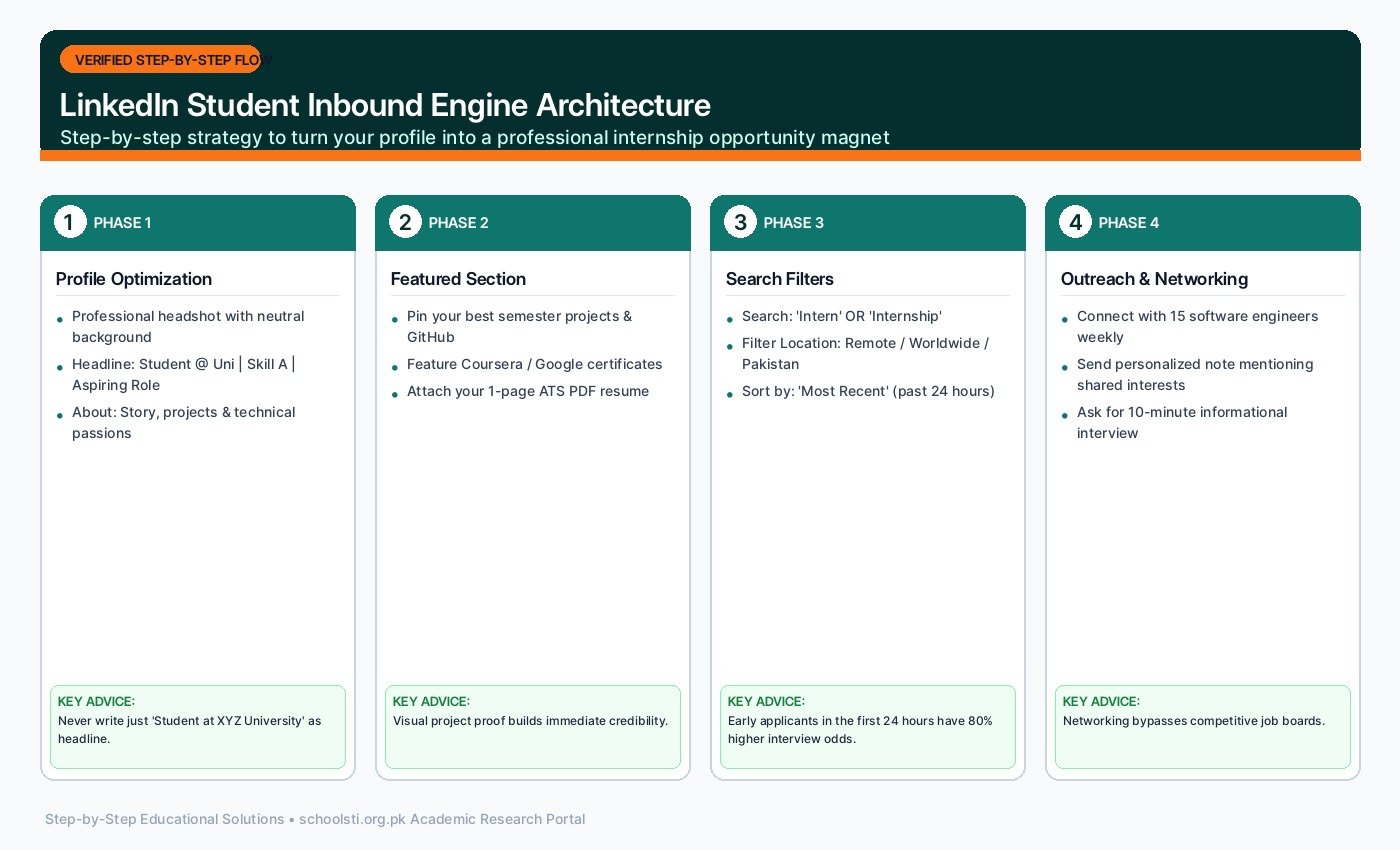
Recruiters decide in seconds whether your profile deserves a second look. Work through these steps once, and your profile will keep working for you around the clock.
- Create the account and add a real photo Sign up with your professional email address and use your real name, as written on your documents. Upload a clear head-and-shoulders photo with a plain background and natural light — no sunglasses, filters, or group crops. Profiles with photos get far more views, and recruiters distrust faceless accounts.
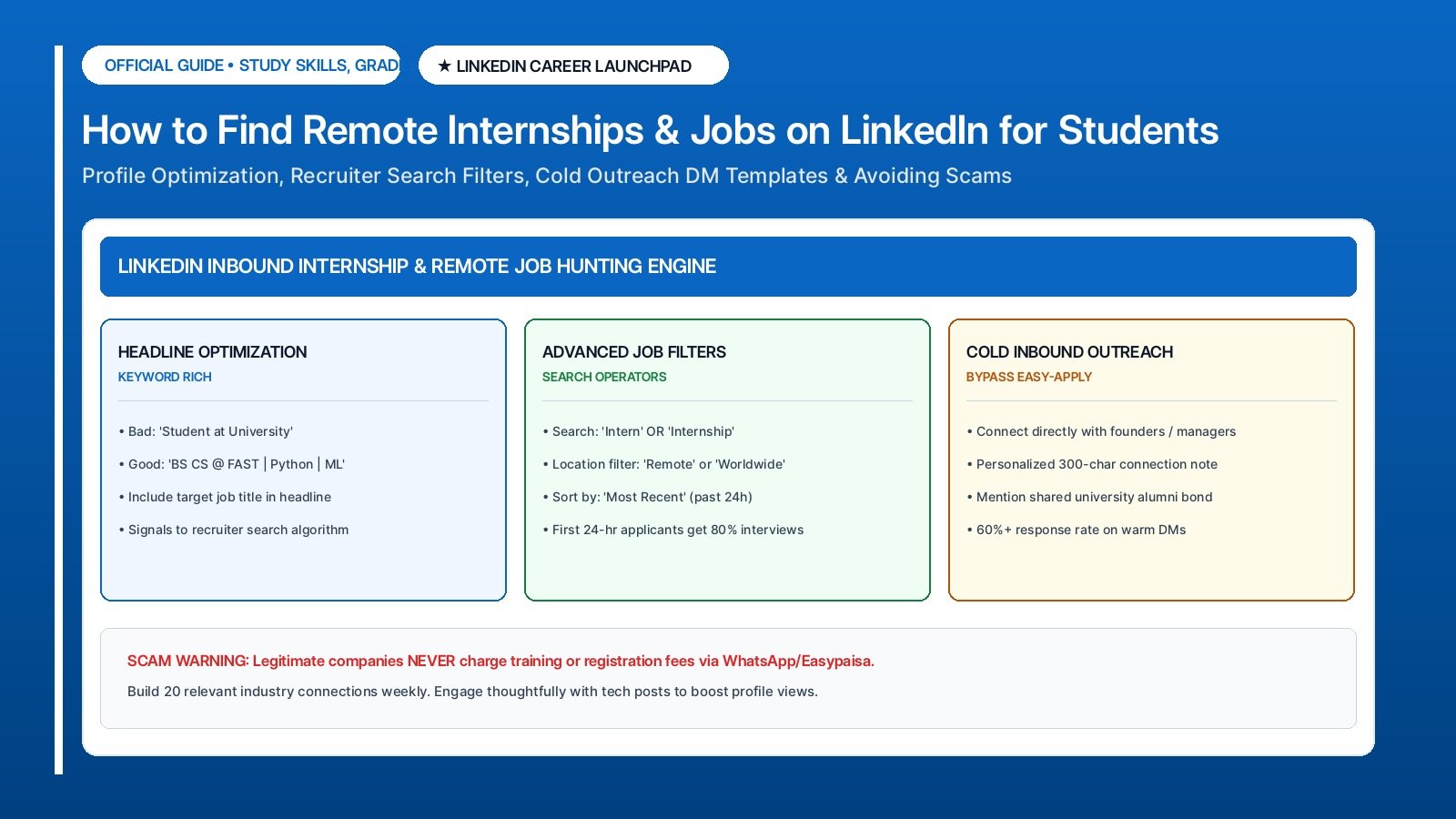
- Write a student-smart headline Your headline appears under your name in every search, so make it say what you offer. Use this formula: field of study, plus skills, plus goal. Example: "BSc Computer Science Student | Excel, Canva and Basic Web Design | Seeking Remote Internships." Avoid empty phrases like "Dreamer" — recruiters search for skills, not slogans.
- Fill the About section like a short pitch Write four to six lines in first person: who you are, what you study, which skills you can actually use, and what kind of internship you want. End with one line inviting contact, such as "Open to remote internship opportunities — feel free to message me." Keep it honest; every claim here may come up in an interview.
- Add experience — including unpaid work List internships, volunteer roles, society positions, freelance gigs, and serious projects under Experience, with one or two result-focused bullets each. LinkedIn does not require the work to be paid — it requires it to be real. A volunteer social media manager entry with genuine results beats an empty profile every time.
- Complete education and add certifications Add your college or university, degree programme, and expected graduation year. Then add certificates from recognised learning platforms — name the platform and the course honestly. Certificates do not replace skills, but they show a recruiter that you invest in your own growth.
- Add skills and pin your top three Add eight to twelve real skills, then pin the three strongest at the top of the section. Ask teachers, classmates, or previous supervisors to endorse the ones they have seen you use. Endorsements are social proof, and recruiters scan this section in seconds.
- Turn on Open to Work — carefully Use the "Open to work" feature with job titles like "Remote Intern" or "Data Entry Assistant," locations including "Remote," and job types "Internship" and "Full-time." You can show it to recruiters only, which keeps your search private from your current network while still appearing in recruiter searches.
Search and Apply Strategically, Step by Step
Most students open LinkedIn Jobs, scroll, and give up. A short system turns the same platform into a pipeline. Follow these steps two or three times a week.
- Use filters, not the default feed Open LinkedIn Jobs and set filters: location "Pakistan" or "Remote," experience level "Internship" and "Entry level," and date posted "Past week." Saved filters turn a random scroll into a targeted list of roles you can actually win. Review new postings a few times a week rather than once a month.
- Set job alerts for your target roles Create alerts for three to five exact titles, such as "remote data entry intern," "social media intern Pakistan," or "junior graphic designer remote." LinkedIn will notify you when matching jobs appear. Early applicants get noticed more, so alerts are a genuine competitive advantage.
- Research the company before you apply Open the company page and check the employee count, recent posts, and whether real people list it as their workplace. A company page with no employees, no posts, and no website is a warning sign. Five minutes of checking saves you from scams and from wasting tailored applications on dead listings.
- Apply properly — Easy Apply is not always best If the posting offers Easy Apply, use it, but attach your tailored one-page resume PDF every time. When the posting links to a company careers page, apply there too — some employers only review applications submitted on their own site. Never apply with an empty or half-finished profile; recruiters do open it.
- Write a short note with key applications When LinkedIn lets you add a message, keep it to three lines: who you are, why this role fits, one proof. Example: "Final-year BBA student with Excel and Canva experience, applying for the remote marketing intern role. I managed social media for my college society, growing it past 2,000 followers. Thank you for your consideration." Polite, specific, short.
- Track everything in a simple sheet Record each application: company, role, date, link, and status. Follow up once after seven to ten days with a brief polite message. A tracker stops you from re-applying to the same role, shows which approaches get replies, and keeps a months-long search organised instead of chaotic.
| Outreach Method | Effort Required | Typical Response Rate | Interview Conversion | Best Practices |
|---|---|---|---|---|
| "Easy Apply" Button | 1 Click (Passive) | 1% to 3% (Lost in 1,000+ queue) | Extremely low | Only use for newly posted jobs (< 2 hours old) |
| Direct DM to Founder / HR | 5 Minutes (Tailored) | 35% to 50% response | Very high (Warm lead) | Highlight 1 specific project solving their current problem |
| Alumni Referral Request | 10 Minutes (Warm networking) | 60% to 75% response | Highest interview rate | Connect with seniors from your university working at target firm |
| Showcasing Public Projects on Feed | 1 Post / Week (Inbound) | Brings inbound recruiter messages | Strongest authority | Share 3-bullet breakdown of what you learned building a project |
Where Remote Internships Actually Hide
Posted job listings are only one channel. The table below maps every place worth checking, so your search covers the full landscape instead of one corner of it.
| Source | What you will find | How to use it |
|---|---|---|
| LinkedIn Jobs with the Remote filter | Posted internships and entry-level roles open to remote applicants | Filter by Remote plus Internship and Entry level; set alerts; apply within the first week |
| Company pages | Roles posted directly by employers, plus clues about company culture | Follow 20 to 30 target companies and check their Jobs tab weekly |
| LinkedIn posts and hashtags | Hiring posts from founders and recruiters, often before formal listings | Search terms like "hiring interns Pakistan"; engage genuinely before asking for referrals |
| LinkedIn Groups and university networks | Alumni referrals and internship announcements | Join your institution's alumni group; ask seniors how they landed their roles |
| Recruiter outreach and connection requests | Direct contact from hiring managers and staffing firms | Accept selectively; verify every recruiter's profile and company before sharing documents |
| Freelance platforms | Short paid projects that become portfolio proof for future applications | Complete two or three small gigs on reputable platforms, then showcase the work on your profile |
Messaging Recruiters and Following Up Without Being Awkward
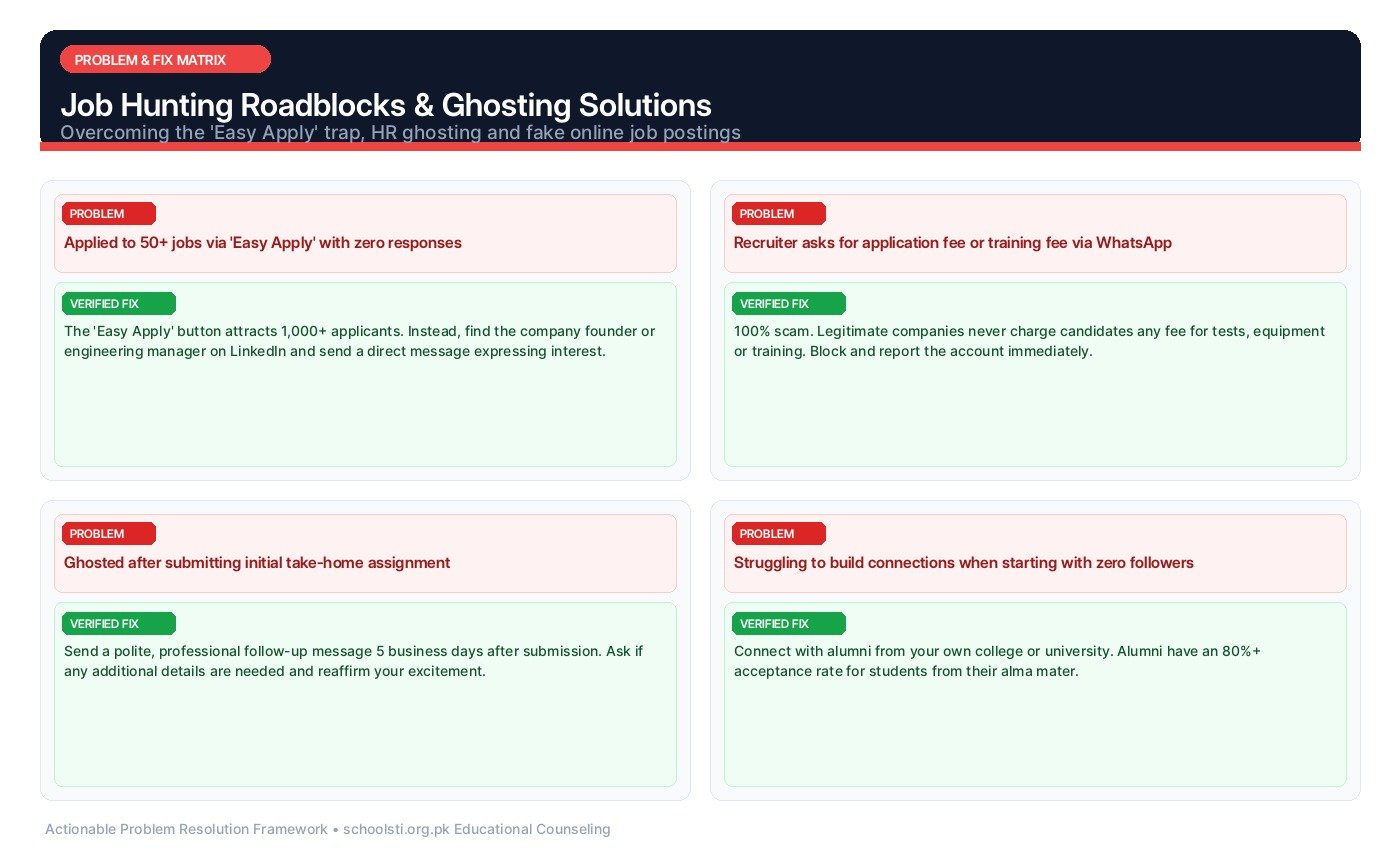
Most students either never message anyone or send desperate mass messages. The middle path works: connect with a short, specific note. Mention something real — the company's recent post, a role you applied for, a shared university. "I applied for your remote content intern role and wanted to express my interest" beats "Please give me a job" every time.
Keep every message short, polite, and easy to answer. Recruiters read messages on phones between meetings; a five-paragraph life story gets deleted. If someone accepts your connection but does not reply, wait a week, send one brief follow-up, then move on. Silence is usually busyness, not rejection — and pestering turns a maybe into a no.
When a recruiter responds positively, reply within 24 hours with exactly what they asked for: your resume, your availability, or a short introduction. Speed and precision signal professionalism louder than any headline.
Stay Safe: Spotting Scam Job Offers
Job scams target students because beginners are eager and less experienced. The golden rule is simple: no genuine employer ever asks you to pay for a job, a training certificate, or a refundable security deposit. Any request for money — by bank transfer, mobile wallet, or any other method — means walk away immediately.
Learn the red flags: interviews conducted only on chat apps with no video call, offers made without any interview, salaries far above market rates for simple work, recruiters using free email addresses instead of company domains, and pressure to decide "today only." Real hiring processes are boring: application, interview, documents, offer letter.
Verify before you trust. Check the recruiter's LinkedIn profile for a real work history and mutual connections, confirm the company exists on its official website, and search the company name together with the word "scam." Guidance reviewed October 2026; platform rules described here follow the latest published policies — verify on the official website if anything looks changed.
Troubleshooting: Common Student Problems & Verified Solutions
Real-world issues reported by Pakistani applicants and students, with actionable step-by-step solutions:
⚠️ Problem: I apply to dozens of jobs but get no responses.
✅ Verified Solution: Volume without targeting fails. Narrow down to roles matching your real skills, tailor your resume keywords to each posting, and apply within days of posting. Also check the basics: an incomplete profile, no photo, or a headline that just says "Student" with no skills makes recruiters skip you before reading anything.
⚠️ Problem: Recruiters view my profile but never reply to my messages.
✅ Verified Solution: Views mean your headline works; silence usually means the message did not. Shorten it to three lines, make one specific point about the role, and end with an easy question. Avoid sending connection requests with the default blank note — a blank request from a stranger is easy to ignore.
⚠️ Problem: How do I know whether a remote job offer is genuine or a scam?
✅ Verified Solution: Apply the checks in the safety section: no upfront payments, a verifiable company website, a recruiter with a real employment history, and a proper interview process. When in doubt, ask a teacher or senior to review the offer with you — a second pair of eyes catches what excitement hides.
⚠️ Problem: I do not have a degree yet — will anyone take me seriously?
✅ Verified Solution: Yes, for internships and entry-level remote roles, which are designed for students. Lead with skills and proof: projects, certificates, volunteer work, and anything you have built. Many small companies prefer a skilled undergraduate over a degreed candidate with nothing to show.
⚠️ Problem: I live in a small city with no big companies nearby.
✅ Verified Solution: That is exactly what remote work solves. Your LinkedIn profile and job alerts do not care about your address. Focus on roles marked Remote, build proof of skills through small projects, and state your internet setup and availability hours clearly in applications.
Frequently Asked Questions (FAQ)
Clear, direct answers to common questions about How to Find Remote Internships and Entry-Level Jobs on LinkedIn for Pakistani Students: